Using Haystack Enterprise Platform Documentation with AI
Connect your AI assistant to search and retrieve information from Haystack Platform documentation using the MCP server. You can also copy and export single pages in Markdown format to use them in your AI assistant.
Use the Haystack Platform Documentation MCP Server
The Haystack Platform documentation is available as a Model Context Protocol (MCP) server that you can connect to your AI assistant to search this documentation directly.
The MCP server is free to use and requires no authentication.
Server URL
The documentation MCP server is available at:
https://docs.cloud.deepset.ai/api/mcp
Server Tools
The MCP server comes with two tools:
search_docs: Search the Haystack Platform documentation.list_doc_sections: List all main documentation sections.
Connect to Cursor
Add this code to your Cursor MCP settings (.cursor/mcp.json) in your project or global settings:
{
  "mcpServers": {
    "deepset-docs": {
      "url": "https://docs.cloud.deepset.ai/api/mcp"
    }
  }
}
Connect to Claude Desktop
Add this code to your Claude Desktop configuration (~/Library/Application Support/Claude/claude_desktop_config.json on macOS or %APPDATA%\Claude\ on Windows):
{
  "mcpServers": {
    "deepset-docs": {
      "url": "https://docs.cloud.deepset.ai/api/mcp"
    }
  }
}
Connect to VS Code
Add this code to your VS Code settings (.vscode/mcp.json):
{
  "mcpServers": {
    "deepset-docs": {
      "url": "https://docs.cloud.deepset.ai/api/mcp"
    }
  }
}
Copy Single Pages
You can also copy a page as Markdown that LLMs can easily read. Use the Copy button in the top right corner of a page.
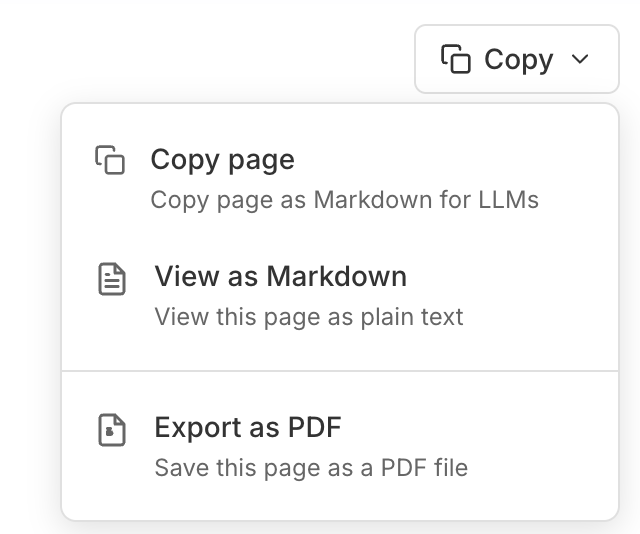
Expand the button to view additional options.
Was this page helpful?