Language Models in Haystack Enterprise Platform
Haystack Enterprise Platform is model agnostic and can load models directly from model providers, such as Hugging Face or OpenAI. You can use publicly available models but also your private ones if you connect Haystack Platform with the model provider.
Models in Your Pipelines
You use models through pipeline components. There are a couple of pipeline components that use models. Have a look at this table for an overview of model applications and components that use them:
| Model Type or Application | Component Using It | Description |
|---|---|---|
| Large language models | LLM, Agent, Legacy components: Generators, including ChatGenerators | Use LLMs for various tasks. To use a regular model, use the LLM component. To use a model iteratively with tools, use the Agent component. You can use models from providers such as OpenAI, Cohere, Azure, and more, or models hosted on AWS SageMaker and Amazon Bedrock. You can also use your custom models that you can define on the Integrations page in Settings. For details, see Custom Models. |
| Embedding models | Embedders | Embedders use embedding models to calculate vector representations for text and documents. There are two types of embedders: document embedders, used in indexing pipelines, and text embedders, used in query pipelines to embed the query. Both types of embedders should use the same embedding models. |
| Question answering models | ExtractiveReader | The reader is used in extractive question answering. It highlights the answer in the document to pinpoint it and it uses transformer-based models to do that. |
| Ranking models | Rankers | Rankers prioritize documents based on the criteria you specify, for example, a particular value in a document's metadata field. Model-based rankers use models to embed the documents and the query and thus build a strong semantic representation of the text. |
To use a model, simply pass its name as a parameter to the component (it's usually the model parameter) or choose the model from the list on the component card. To use a proprietary model, connect Haystack Enterprise Platform to the model provider. Haystack Platform takes care of loading the models.
You can run models locally or remotely. Smaller models, like question answering or embedding models, are fast when run locally. Large models are faster to run remotely as they need optimized hardware. To run a model remotely, you may need to pass additional parameters in model kwargs. For detailed instructions, see the Pipeline Components for the component that uses the model.
When using LLMs with LLM or Agent, you can specify all extra model settings on the Advanced tab:
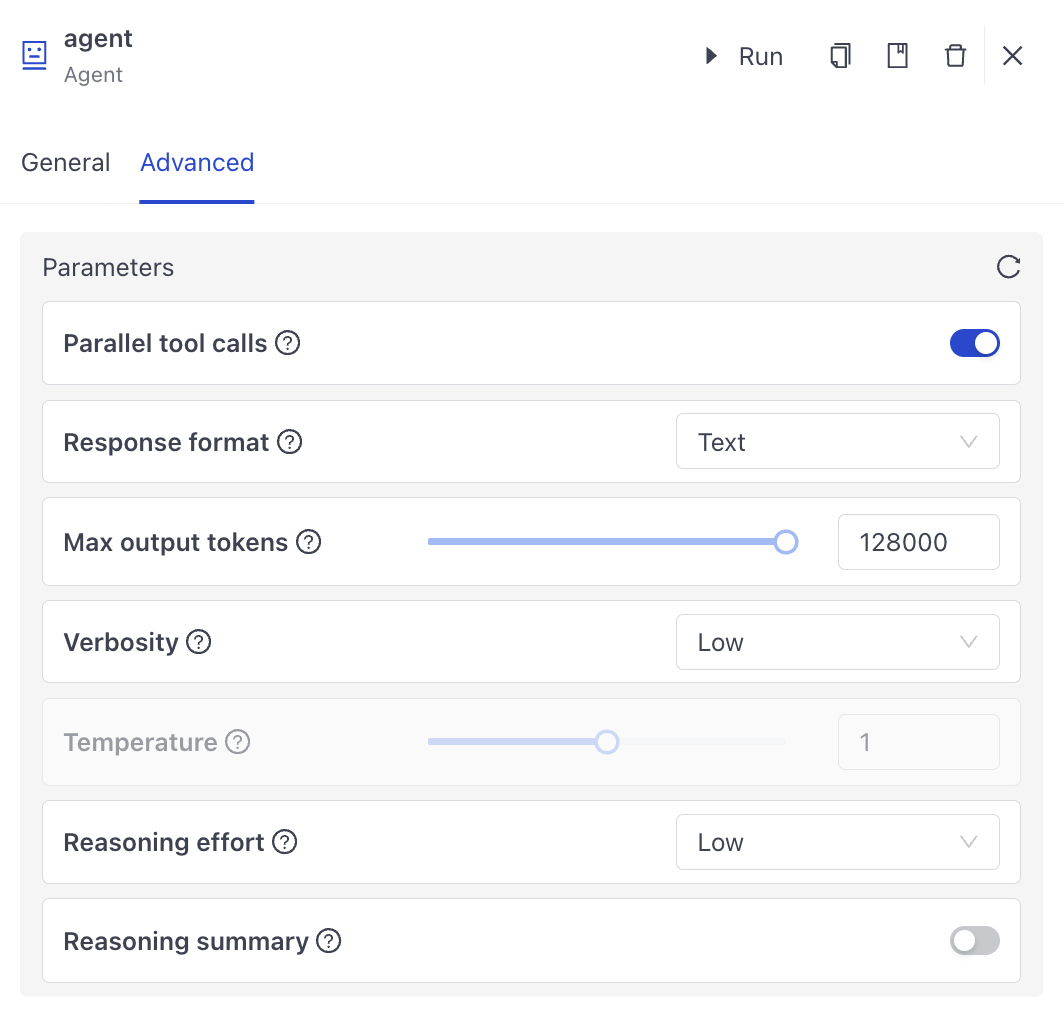
This is the YAML configuration for the Agent's model settings:
components:

  agent:
    init_parameters:
      chat_generator:
        init_parameters:
          model: gpt-5.5
          generation_kwargs:
            reasoning:
              effort: low
            verbosity: low
        type: haystack.components.generators.chat.openai_responses.OpenAIResponsesChatGenerator
      exit_conditions:
      - text
      max_agent_steps: 100
      raise_on_tool_invocation_failure: false
      state_schema:
        documents:
          type: list[haystack.dataclasses.document.Document]
          _meta:
            used_by:
              local_search: output
      streaming_callback: deepset_cloud_custom_nodes.callbacks.streaming.streaming_callback
Compare Models
The Models page helps you pick a model for your pipeline by comparing quality and price across the models available on the platform. You can group and filter the models to compare like with like, for example budget models across all providers, or the top tier of one provider.
Model Classes
Every model belongs to one class. We calculate classes across the whole platform model catalog, using public benchmark and price data:
- Top tier: Chat quality, measured by the LMArena overall score, is in the top 25% of the catalog.
- Budget: The model is not Top tier and is among the cheapest 30% per request.
- Balanced: Every other model that has both a quality score and a price.
- Unknown: The model has no quality score or no price in the public sources, so it was not part of the comparison. Custom models are always Unknown. You can still test Unknown models and build from them.
Cost is shown per 1,000 typical requests. A typical request is 1,000 input tokens and 250 output tokens.
Ratings and Value Verdicts
Each model card shows Quality, Reasoning, and Price ratings in plain language. Each model also gets a value verdict, which drives the insight line, the Best value filter, and the value sort:
- Premium: A model in the workspace at most two thirds of this model's price is within 15 LMArena points of it. That is about LMArena's own confidence interval, so you pay more for no clear quality gain.
- Great value: No model that is at least 10% cheaper is as good.
- Fair: Everything else.
To choose a model, start with Great value models in the class that fits your task. Treat Premium as a sign that a cheaper model gives similar quality.
Where the Data Comes From
The metrics come from a snapshot of public sources, not from live data, and the model card shows the date of the snapshot:
- Prices: LiteLLM.
- Chat quality score and rank: LMArena.
- Reasoning (GPQA Diamond): Epoch AI.
A model that has no price or no LMArena score in the snapshot, for example a newly added model, is shown as Unknown until the snapshot includes it. A model missing only Epoch AI data keeps its class but has no Reasoning rating.
To filter, group, and sort models, see Compare Models.
Recommended Models
Larger models are generally more accurate at the cost of speed.
If you don't know which model to start with, you can use one of the models we recommend.
Large Language Models for RAG
This table lists the models that we recommend for retrieval augmented generation (RAG) QA. You can use them with Generators in your pipelines.
| Model URL | Description | Type |
|---|---|---|
| Claude models by Anthropic | A transformer-based LLM that can be an alternative to the GPT models. It can generate natural language and help with code and translations. | Proprietary |
| GPT models by OpenAI | Large multimodal models, suitable for most tasks. | Proprietary |
For an overview of the models, see Large Language Models Overview.
Hosted LLMs
Currently, on the Connections page you can set up connections with the following model providers:
- Amazon Bedrock
- Azure OpenAI
- Cohere
- Google AI
- Hugging Face (only needed for private models hosted there)
- MongoDB
- NVIDIA
- OpenAI
- SearchAPI
- Together AI
- Voyage AI
- Weights & Biases
Supported connections to data processing services and data sources are:
- Azure AI Document Intelligence
- DeepL
- Snowflake
- Unstructured
Reader Models for Question Answering
This table describes the models that we recommend for the question answering task. You can use them with your Readers.
| Model URL | Description | Language |
|---|---|---|
| deepset/roberta-base-squad2-distilled | A distilled model, relatively fast and with good performance. | English |
| deepset/roberta-large-squad2 | A large model with good performance. Slower than the distilled one. | English |
| deepset/xlm-roberta-base-squad2 | A base model with good speed and performance. | Multilingual |
| deepset/tinyroberta-squad2 | A very fast model. | English |
You can also view state-of-the-art question answering models on the Hugging Face leaderboard.
Embedding Models
This table describes the embedding models we recommend for calculating vector representations of text. You can use them with dedicated Embedders.
| Model Provider | Model Name | Description | Language |
|---|---|---|---|
| Cohere | embed-english-v2.0 embed-english-light-v2.0 | See Cohere documentation. | English |
| Cohere | embed-multilingual-v2.0 | See Cohere documentation. | Multilingual |
| OpenAI | text-adda-002 | See OpenAI documentation. | English |
| Sentence Transformers | sentence-transformers/multi-qa-mpnet-base-do-v1 | Vector dimension*: 768 | English |
| Sentence Transformers | intfloat/e5-base-v2 | Vector dimension*: 768 | English |
| Sentence Transformers | intfloat/e5-large-v2 | Vector dimension*: 1024 Slower than e5-base-v2 but performs better | English |
| Sentence Transformers | intfloat/multilingual-e5-base | Vector dimension*: 768 | Multilingual |
| Sentence Transformers | intfloat/multilingual-e5-large | Vector dimension* 1024 | Multilingual |
*In language models, vector dimension refers to the number of elements a vector representing a word contains, capturing its meaning and usage. The more dimensions, or numbers, in this vector, the more detail the model can understand about the word, though it also makes the model more complex to handle. It's best to try out different models and see what works best for your data.
Ranker Models
This table lists models to use with Rankers to rank documents.
| Model | Description | Language |
|---|---|---|
| intfloat/simlm-msmarco-reranker | The best ranker model currently available. | English |
| cross-encoder/ms-marco-MiniLM-L-12-v2 | A slightly bigger and slower model. | English |
| cross-encoder/ms-marco-MiniLM-L-6-v2 | Slightly faster than ms-marco-MiniLM-L-12-v2 | English |
| svalabs/cross-electra-ms-marco-german-uncased | In our practice, this is the best model for German. | German |
| jeffwan/mmarco-mMiniLMv2-L12-H384-v1 | A quite fast, multilingual model. | Multilingual |
| rerank-english-v2.0 | A Cohere model for English data. | English |
| rerank-multilingual-v2.0 | A Cohere model for multilingual data. | Multilingual |
Was this page helpful?