Code
Add your own Python code to a pipeline quickly and easily. The Code component validates your code instantly as you type it.
Key Features
- Write and run custom Python logic directly in Pipeline Builder without creating a separate custom component.
- Code is validated as you type, with errors shown inline.
- Supports saving and reusing components across multiple pipelines.
- Inputs and outputs are defined dynamically through the
run()method, so the component connects to any other component with matching types. - Includes an AI assistant to help generate code.
- Works with all standard dependencies available in Haystack Platform.
- When your class defines
__init__parameters, an Advanced tab appears in the configuration panel so you can set those values from the UI.
Configuration
- Drag the
Codecomponent onto the canvas from the Component Library. - Click the component to open the configuration panel.
- Enter or paste your Python code in the
codefield. The code must define exactly one class decorated with@componentand expose arun()method. The component validates your code as you type. If there are errors, a red error message appears in thecodefield. - If your class defines
__init__parameters, click the Advanced tab in the configuration panel to set their values. Each parameter appears as an inline control — a text field for strings, a number field for numbers, a toggle for booleans, and a dropdown for enum types. For complex types such as objects or dicts, an expandable editor appears.
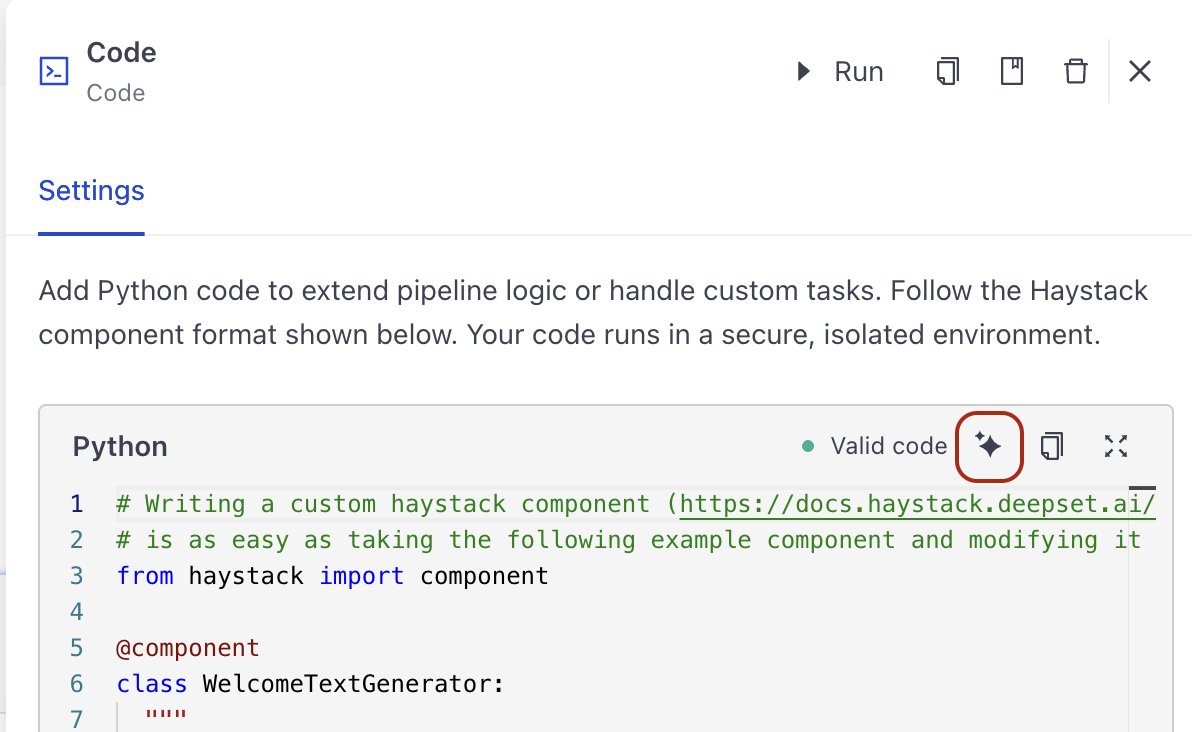
You can use the AI assistant to generate code for your Code component. To do this, click the AI Assistant button on the component card and write your request in the prompt.
Connections
You define the Code component's inputs and outputs in its run() method. The component connects to any other component whose inputs and outputs match the types you declare. Make sure the types in your run() method signature match the types of the components you want to connect to.
Component's Structure
Each component is a Python class with the following required elements:
- The
from haystack import componentimport statement. - The
@componentdecorator to indicate you're creating a component. - The
run()method that defines what the component does.- The
run()method must have the@component.output_typesdecorator to define the type of data the component outputs and the name of the outputting edge. The names and types you define as output types must match the keys and value types of the dictionary object therun()method returns. For details, see Examples below. - You can specify the input parameters for the
run()method. - The
run()method must return a dictionary with the keys and values you specify.
- The
Optionally, you can add __init__ parameters to your component. This is useful if you want to configure the component at runtime. The __init__ parameters are shown on the Advanced tab on the component's configuration. Make sure the parameters have default values.
Available Dependencies
Your Code component has access to standard dependencies available in Haystack Platform. Expand this section to check available dependencies:
Available Dependencies
indexing
| Package | Version |
|---|---|
| abnf | ==2.2.0 |
| accelerate | ==1.14.0 |
| adbc-driver-manager | ==1.11.0 |
| adbc-driver-snowflake | ==1.11.0 |
| aimlapi-haystack | ==2.0.0 |
| aiobotocore | ==3.7.0 |
| aiofiles | ==25.1.0 |
| aiohappyeyeballs | ==2.6.2 |
| aiohttp | ==3.14.1 |
| aioitertools | ==0.13.0 |
| aiolimiter | ==1.2.1 |
| aiosignal | ==1.4.0 |
| aiosqlite | ==0.22.1 |
| aliyun-python-sdk-core | ==2.11.5 |
| aliyun-python-sdk-core-v3 | ==2.11.5 |
| aliyun-python-sdk-kms | ==2.16.5 |
| alloydb-haystack | ==0.1.0 |
| amazon-bedrock-haystack | ==6.10.2 |
| amazon-sagemaker-haystack | ==0.3.0 |
| amazon-textract-haystack | ==1.0.0 |
| annotated-doc | ==0.0.4 |
| annotated-types | ==0.7.0 |
| anthropic | ==0.107.1 |
| anthropic-haystack | ==5.9.0 |
| antlr4-python3-runtime | ==4.9.3 |
| anyio | ==4.13.0 |
| appdirs | ==1.4.4 |
| arcadedb-haystack | ==1.2.0 |
| arrow | ==1.4.0 |
| asn1crypto | ==1.5.1 |
| astra-haystack | ==4.3.0 |
| astrapy | ==1.5.2 |
| asyncpg | ==0.31.0 |
| attrs | ==26.1.0 |
| audioread | ==3.1.0 |
| Authlib | ==1.7.2 |
| azure-ai-documentintelligence | ==1.0.2 |
| azure-ai-formrecognizer | ==3.3.3 |
| azure-ai-search-haystack | ==4.0.0 |
| azure-common | ==1.1.28 |
| azure-core | ==1.41.0 |
| azure-doc-intelligence-haystack | ==1.0.0 |
| azure-identity | ==1.25.3 |
| azure-search-documents | ==12.0.0 |
| babel | ==2.18.0 |
| backoff | ==2.2.1 |
| batched | ==0.1.5 |
| bcrypt | ==5.0.0 |
| beautifulsoup4 | ==4.15.0 |
| blis | ==1.3.3 |
| boltons | ==25.0.0 |
| boto3 | ==1.42.54 |
| boto3-extensions | ==0.23.0 |
| botocore | ==1.42.54 |
| bracex | ==2.6 |
| brave-haystack | ==0.1.0 |
| build | ==1.5.0 |
| bytecode | ==0.18.1 |
| catalogue | ==2.0.10 |
| certifi | ==2026.5.20 |
| cffi | ==2.0.0 |
| chardet | ==7.4.3 |
| charset-normalizer | ==3.4.7 |
| chroma-haystack | ==4.3.0 |
| chromadb | ==1.5.9 |
| cint | ==1.0.0 |
| click | ==8.3.1 |
| cloudpathlib | ==0.24.0 |
| cohere | ==5.21.1 |
| cohere-haystack | ==4.2.0 |
| colorlog | ==6.10.1 |
| cometapi-haystack | ==2.1.0 |
| confection | ==1.3.3 |
| courlan | ==1.4.0 |
| crcmod | ==1.7 |
| cryptography | ==48.0.0 |
| cymem | ==2.0.13 |
| datasets | ==5.0.0 |
| dateparser | ==1.4.0 |
| dc-consumer-indexing | ==2.4.14 |
| dc-unified-logging | ==0.0.5 |
| ddtrace | ==3.16.0 |
| decorator | ==5.3.1 |
| deepl | ==1.30.0 |
| deepl-haystack | ==0.3.0 |
| deepset-cloud-custom-nodes | ==2.0.305 |
| deepset-cloud-sdk | ==1.7.6 |
| defusedxml | ==0.7.1 |
| Deprecated | ==1.3.1 |
| deprecation | ==2.1.0 |
| dill | ==0.4.1 |
| diskcache | ==5.6.3 |
| distro | ==1.9.0 |
| dnspython | ==2.8.0 |
| docker | ==7.1.0 |
| dockerfile-parse | ==2.0.1 |
| docling | ==2.98.0 |
| docling-core | ==2.79.0 |
| docling-haystack | ==0.3.0 |
| docling-ibm-models | ==3.13.3 |
| docling-parse | ==6.2.0 |
| docling-serve-haystack | ==1.0.0 |
| docling-slim | ==2.98.0 |
| docstring_parser | ==0.18.0 |
| durationpy | ==0.10 |
| e2b | ==2.26.0 |
| e2b-haystack | ==1.0.0 |
| editdistance | ==0.8.1 |
| elastic-transport | ==8.17.1 |
| elasticsearch | ==8.19.3 |
| elasticsearch-haystack | ==5.4.0 |
| emoji | ==2.15.0 |
| envier | ==0.6.1 |
| et_xmlfile | ==2.0.0 |
| eval_type_backport | ==0.4.0 |
| evaluate | ==0.4.6 |
| Events | ==0.5 |
| exceptiongroup | ==1.3.1 |
| face | ==26.0.0 |
| Faker | ==40.21.0 |
| FalkorDB | ==1.6.1 |
| falkordb-haystack | ==1.1.0 |
| fastapi | ==0.136.3 |
| fastavro | ==1.12.2 |
| fastcore | ==1.13.2 |
| fastembed | ==0.8.0 |
| fastembed-haystack | ==1.4.1 |
| fastuuid | ==0.14.0 |
| ffmpeg-python | ==0.2.0 |
| fickling | ==0.1.11 |
| filelock | ==3.29.1 |
| filetype | ==1.2.0 |
| fire | ==0.7.1 |
| firecrawl-haystack | ==1.1.0 |
| firecrawl-py | ==4.28.2 |
| flatbuffers | ==25.12.19 |
| frozenlist | ==1.8.0 |
| fsspec | ==2026.4.0 |
| funasr | ==1.3.9 |
| funasr-haystack | ==0.0.1 |
| future | ==1.0.0 |
| gitdb | ==4.0.12 |
| github-haystack | ==1.2.0 |
| GitPython | ==3.1.50 |
| glom | ==24.11.0 |
| google-api-core | ==2.31.0 |
| google-auth | ==2.53.0 |
| google-cloud-alloydb | ==0.10.0 |
| google-cloud-alloydb-connector | ==1.13.0 |
| google-genai | ==2.8.0 |
| google-genai-haystack | ==3.1.0 |
| googleapis-common-protos | ==1.75.0 |
| gql | ==4.0.0 |
| graphql-core | ==3.2.11 |
| graphviz | ==0.21 |
| greenlet | ==3.5.1 |
| grpc-google-iam-v1 | ==0.14.4 |
| grpcio | ==1.78.0 |
| grpcio-status | ==1.71.2 |
| h11 | ==0.16.0 |
| h2 | ==4.3.0 |
| haystack-ai | ==3.0.0 |
| haystack-experimental | ==0.19.0 |
| hf-xet | ==1.5.0 |
| hpack | ==4.1.0 |
| html5lib | ==1.1 |
| htmldate | ==1.10.0 |
| httpcore | ==1.0.9 |
| httpr | ==0.4.8 |
| httptools | ==0.8.0 |
| httpx | ==0.28.1 |
| httpx-sse | ==0.4.3 |
| huggingface-api-haystack | ==0.2.0 |
| huggingface_hub | ==0.36.2 |
| hydra-core | ==1.3.2 |
| hyperframe | ==6.1.0 |
| idna | ==3.18 |
| importlib_metadata | ==8.6.1 |
| importlib_resources | ==7.1.0 |
| iniconfig | ==2.3.0 |
| installer | ==0.7.0 |
| intervaltree | ==3.2.1 |
| invoke | ==2.2.1 |
| isodate | ==0.7.2 |
| jaconv | ==0.5.0 |
| jamo | ==0.4.1 |
| jieba | ==0.42.1 |
| jina-haystack | ==0.5.1 |
| Jinja2 | ==3.1.6 |
| jiter | ==0.15.0 |
| jmespath | ==1.1.0 |
| joblib | ==1.5.3 |
| joserfc | ==1.7.1 |
| jq | ==1.11.0 |
| jsonlines | ==4.0.0 |
| jsonpatch | ==1.33 |
| jsonpointer | ==3.1.1 |
| jsonref | ==1.1.0 |
| jsonschema | ==4.26.0 |
| jsonschema-specifications | ==2025.9.1 |
| jusText | ==3.0.2 |
| kaitaistruct | ==0.11 |
| kaldiio | ==2.18.1 |
| kubernetes | ==36.0.2 |
| langchain | ==1.3.2 |
| langchain-classic | ==1.0.7 |
| langchain-community | ==0.4.2 |
| langchain-core | ==1.4.1 |
| langchain-openai | ==1.2.2 |
| langchain-protocol | ==0.0.16 |
| langchain-text-splitters | ==1.1.2 |
| langdetect | ==1.0.9 |
| langfuse | ==2.60.10 |
| langfuse-haystack | ==2.2.0 |
| langgraph | ==1.2.2 |
| langgraph-checkpoint | ==4.1.1 |
| langgraph-prebuilt | ==1.1.0 |
| langgraph-sdk | ==0.3.15 |
| langsmith | ==0.8.9 |
| lara-haystack | ==1.0.0 |
| lara-sdk | ==1.11.0 |
| latex2mathml | ==3.81.0 |
| lazy-loader | ==0.5 |
| lazy_imports | ==1.2.0 |
| librosa | ==0.11.0 |
| litellm | ==1.88.0 |
| litellm-haystack | ==1.0.0 |
| llama-cpp-haystack | ==1.1.0 |
| llama-stack-api | ==0.7.2 |
| llama-stack-haystack | ==1.0.0 |
| llama_cpp_python | ==0.3.28 |
| llama_stack | ==0.4.6 |
| llvmlite | ==0.47.0 |
| loguru | ==0.7.3 |
| lxml | ==6.1.1 |
| lxml_html_clean | ==0.4.5 |
| magika | ==0.6.2 |
| mail-parser | ==4.3.0 |
| markdown-it-py | ==3.0.0 |
| markdownify | ==1.2.2 |
| markitdown | ==0.1.6 |
| markitdown-haystack | ==1.0.0 |
| marko | ==2.2.3 |
| MarkupSafe | ==3.0.3 |
| mcp | ==1.27.2 |
| mcp-haystack | ==1.0.0 |
| mdit-plain | ==1.0.1 |
| mdurl | ==0.1.2 |
| mem0-haystack | ==0.1.0 |
| mem0ai | ==2.0.4 |
| meta-llama-haystack | ==1.1.0 |
| mistral-haystack | ==1.0.1 |
| mistralai | ==1.9.11 |
| mmh3 | ==5.2.1 |
| modelscope | ==1.37.1 |
| mongodb-atlas-haystack | ==3.2.1 |
| more-itertools | ==11.1.0 |
| mpire | ==2.10.2 |
| mpmath | ==1.3.0 |
| msal | ==1.37.0 |
| msal-extensions | ==1.3.1 |
| msgpack | ==1.1.2 |
| msgspec | ==0.21.1 |
| msrest | ==0.7.1 |
| multidict | ==6.7.1 |
| multiprocess | ==0.70.19 |
| murmurhash | ==1.0.15 |
| mxbai-rerank | ==0.1.6 |
| narwhals | ==2.22.1 |
| nest-asyncio | ==1.6.0 |
| networkx | ==3.6.1 |
| nltk | ==3.9.4 |
| numba | ==0.65.1 |
| numpy | ==1.26.4 |
| nvidia-haystack | ==0.3.0 |
| oauthlib | ==3.3.1 |
| olefile | ==0.47 |
| ollama | ==0.6.2 |
| ollama-haystack | ==3.0.1 |
| omegaconf | ==2.3.0 |
| onnxruntime | ==1.26.0 |
| openai | ==2.41.0 |
| opencv-python | ==4.11.0.86 |
| openinference-instrumentation | ==0.1.53 |
| openinference-instrumentation-haystack | ==0.1.30 |
| openinference-semantic-conventions | ==0.1.30 |
| openpyxl | ==3.1.5 |
| openrouter-haystack | ==0.2.0 |
| opensearch-haystack | ==8.1.0 |
| opensearch-protobufs | ==1.2.0 |
| opensearch-py | ==3.2.0 |
| opentelemetry-api | ==1.33.1 |
| opentelemetry-exporter-otlp-proto-common | ==1.33.1 |
| opentelemetry-exporter-otlp-proto-grpc | ==1.33.1 |
| opentelemetry-exporter-otlp-proto-http | ==1.33.1 |
| opentelemetry-instrumentation | ==0.54b1 |
| opentelemetry-proto | ==1.33.1 |
| opentelemetry-sdk | ==1.33.1 |
| opentelemetry-semantic-conventions | ==0.54b1 |
| oracle-haystack | ==0.2.0 |
| oracledb | ==2.5.1 |
| orjson | ==3.11.9 |
| ormsgpack | ==1.12.2 |
| oss2 | ==2.13.1 |
| overrides | ==7.7.0 |
| packaging | ==24.2 |
| pandas | ==3.0.3 |
| pdf2image | ==1.17.0 |
| pdfminer.six | ==20250506 |
| perplexity-haystack | ==0.1.1 |
| pgvector | ==0.4.2 |
| pgvector-haystack | ==6.3.0 |
| phonenumbers | ==9.0.32 |
| pika | ==1.3.2 |
| pillow | ==12.2.0 |
| pinecone | ==9.1.0 |
| pinecone_haystack | ==5.1.0 |
| platformdirs | ==4.10.0 |
| pluggy | ==1.6.0 |
| polars | ==1.41.2 |
| polars-runtime-32 | ==1.41.2 |
| polyfactory | ==3.3.0 |
| polyfile-weave | ==0.5.7 |
| pooch | ==1.9.0 |
| portalocker | ==3.2.0 |
| posthog | ==7.18.0 |
| preshed | ==3.0.13 |
| presidio-haystack | ==2.1.0 |
| presidio_analyzer | ==2.2.362 |
| presidio_anonymizer | ==2.2.362 |
| prompt_toolkit | ==3.0.52 |
| propcache | ==0.5.2 |
| proto-plus | ==1.28.0 |
| protobuf | ==4.25.9 |
| psutil | ==7.2.2 |
| psycopg | ==3.3.4 |
| psycopg-binary | ==3.3.4 |
| psycopg2-binary | ==2.9.12 |
| py_rust_stemmers | ==0.1.8 |
| pyarrow | ==24.0.0 |
| pyasn1 | ==0.6.3 |
| pyasn1_modules | ==0.4.2 |
| pybase64 | ==1.4.3 |
| pyclipper | ==1.4.0 |
| pycparser | ==3.0 |
| pycryptodome | ==3.23.0 |
| pydantic | ==2.12.5 |
| pydantic-settings | ==2.14.1 |
| pydantic_core | ==2.41.5 |
| Pygments | ==2.20.0 |
| PyJWT | ==2.13.0 |
| pylatexenc | ==2.10 |
| pymongo | ==10.10.10.10 |
| pynndescent | ==0.6.0 |
| pyOpenSSL | ==26.2.0 |
| pypdf | ==5.1.0 |
| pypdfium2 | ==5.9.0 |
| PyPika | ==0.51.1 |
| pyproject_hooks | ==1.2.0 |
| pyrate-limiter | ==4.2.0 |
| pytest | ==8.4.2 |
| pytest-dotenv | ==0.5.2 |
| python-dateutil | ==2.9.0.post0 |
| python-docx | ==1.1.2 |
| python-dotenv | ==1.2.2 |
| python-iso639 | ==2026.4.20 |
| python-magic | ==0.4.27 |
| python-multipart | ==0.0.32 |
| python-oxmsg | ==0.0.2 |
| python-pptx | ==1.0.2 |
| python-rapidjson | ==1.23 |
| pytz | ==2026.2 |
| pyversity | ==0.2.0 |
| pyversity-haystack | ==1.0.0 |
| pyvespa | ==1.2.1 |
| PyYAML | ==6.0.3 |
| qdrant-client | ==1.18.0 |
| qdrant-haystack | ==9.1.1 |
| ragas | ==0.2.15 |
| ragas-haystack | ==2.2.0 |
| RapidFuzz | ==3.14.5 |
| rapidocr | ==3.8.1 |
| redis | ==8.0.0 |
| referencing | ==0.37.0 |
| regex | ==2026.5.9 |
| requests | ==2.34.2 |
| requests-file | ==3.0.1 |
| requests-oauthlib | ==2.0.0 |
| requests-toolbelt | ==1.0.0 |
| rich | ==15.0.0 |
| rpds-py | ==2026.5.1 |
| rtree | ==1.4.1 |
| ruamel.yaml | ==0.19.1 |
| s3transfer | ==0.16.1 |
| safetensors | ==0.7.0 |
| scikit-learn | ==1.9.0 |
| scipy | ==1.17.1 |
| semchunk | ==3.2.5 |
| sentence-transformers | ==5.5.1 |
| sentencepiece | ==0.2.1 |
| sentry-sdk | ==2.61.1 |
| setfit | ==1.1.3 |
| setuptools | ==82.0.1 |
| shapely | ==2.1.2 |
| shellingham | ==1.5.4 |
| six | ==1.17.0 |
| smart_open | ==7.6.1 |
| smmap | ==5.0.3 |
| sniffio | ==1.3.1 |
| snowflake-connector-python | ==4.6.0 |
| snowflake-haystack | ==2.0.0 |
| sortedcontainers | ==2.4.0 |
| soundfile | ==0.14.0 |
| soupsieve | ==2.8.4 |
| soxr | ==1.1.0 |
| spacy | ==3.8.14 |
| spacy-legacy | ==3.0.12 |
| spacy-loggers | ==1.0.5 |
| SQLAlchemy | ==2.0.50 |
| sqlalchemy-haystack | ==0.1.0 |
| srsly | ==2.5.3 |
| sse-starlette | ==3.4.4 |
| stackit-haystack | ==1.2.0 |
| starlette | ==1.2.1 |
| structlog | ==25.5.0 |
| supabase-haystack | ==0.1.0 |
| sympy | ==1.14.0 |
| tabulate | ==0.10.0 |
| tavily-haystack | ==0.1.0 |
| tavily-python | ==0.7.25 |
| tenacity | ==9.1.4 |
| tensorboardX | ==2.6.5 |
| termcolor | ==3.3.0 |
| thinc | ==8.3.13 |
| threadpoolctl | ==3.6.0 |
| tika | ==2.6.0 |
| tiktoken | ==0.13.0 |
| tld | ==0.13.2 |
| tldextract | ==5.3.1 |
| togetherai-haystack | ==2.0.0 |
| tokenizers | ==0.21.4 |
| toml | ==0.10.2 |
| tomlkit | ==0.15.0 |
| torch | ==2.8.0+cpu |
| torch-complex | ==0.4.4 |
| torchaudio | ==2.11.0 |
| torchvision | ==0.23.0+cpu |
| tornado | ==6.5.6 |
| tqdm | ==4.68.1 |
| trafilatura | ==2.0.0 |
| transformers | ==4.55.4 |
| tree-sitter | ==0.25.2 |
| tree-sitter-c | ==0.24.2 |
| tree-sitter-javascript | ==0.25.0 |
| tree-sitter-python | ==0.25.0 |
| tree-sitter-typescript | ==0.23.2 |
| tritonclient | ==2.51.0 |
| typer | ==0.21.2 |
| types-requests | ==2.33.0.20260518 |
| typing-inspection | ==0.4.2 |
| typing_extensions | ==4.15.0 |
| tzdata | ==2026.2 |
| tzlocal | ==5.3.1 |
| umap-learn | ==0.5.12 |
| unstructured | ==0.21.5 |
| unstructured-client | ==0.42.3 |
| unstructured-fileconverter-haystack | ==1.0.0 |
| urllib3 | ==2.7.0 |
| uuid6 | ==2025.0.1 |
| uuid_utils | ==0.16.0 |
| uvicorn | ==0.49.0 |
| uvloop | ==0.22.1 |
| validators | ==0.35.0 |
| valkey-glide | ==2.4.1 |
| valkey-glide-sync | ==2.4.1 |
| valkey-haystack | ==0.2.0 |
| vespa-haystack | ==1.0.0 |
| vllm-haystack | ==1.1.0 |
| voyage-embedders-haystack | ==1.5.0 |
| voyageai | ==0.4.0 |
| wandb | ==0.27.2 |
| wasabi | ==1.1.3 |
| watchfiles | ==1.2.0 |
| wcmatch | ==10.1 |
| wcwidth | ==0.8.1 |
| weasel | ==1.0.0 |
| weave | ==0.52.25 |
| weave-haystack | ==2.0.0 |
| weaviate-client | ==4.21.3 |
| weaviate-haystack | ==6.0.0 |
| webencodings | ==0.5.1 |
| websocket-client | ==1.9.0 |
| websockets | ==16.0 |
| wrapt | ==1.17.3 |
| xlsxwriter | ==3.2.9 |
| xxhash | ==3.7.0 |
| yarl | ==1.24.2 |
| yaspin | ==3.4.0 |
| zipp | ==4.1.0 |
| zstandard | ==0.25.0 |
queryapi
| Package | Version |
|---|---|
| abnf | ==2.2.0 |
| accelerate | ==1.13.0 |
| adbc-driver-manager | ==1.11.0 |
| adbc-driver-snowflake | ==1.11.0 |
| aimlapi-haystack | ==2.0.0 |
| aiobotocore | ==3.7.0 |
| aiofiles | ==25.1.0 |
| aiohappyeyeballs | ==2.6.2 |
| aiohttp | ==3.14.1 |
| aioitertools | ==0.13.0 |
| aiolimiter | ==1.2.1 |
| aiosignal | ==1.4.0 |
| aiosqlite | ==0.22.1 |
| aliyun-python-sdk-core | ==2.11.5 |
| aliyun-python-sdk-core-v3 | ==2.11.5 |
| aliyun-python-sdk-kms | ==2.16.5 |
| alloydb-haystack | ==0.1.0 |
| amazon-bedrock-haystack | ==6.10.2 |
| amazon-sagemaker-haystack | ==0.3.0 |
| amazon-sns-extended-client | ==1.0.1 |
| amazon-textract-haystack | ==1.0.0 |
| annotated-doc | ==0.0.4 |
| annotated-types | ==0.7.0 |
| anthropic | ==0.107.1 |
| anthropic-haystack | ==5.9.0 |
| antlr4-python3-runtime | ==4.9.3 |
| anyio | ==4.13.0 |
| appdirs | ==1.4.4 |
| arcadedb-haystack | ==1.2.0 |
| arrow | ==1.4.0 |
| asn1crypto | ==1.5.1 |
| astra-haystack | ==4.3.0 |
| astrapy | ==1.5.2 |
| asyncer | ==0.0.17 |
| asyncpg | ==0.31.0 |
| attrs | ==26.1.0 |
| audioread | ==3.1.0 |
| Authlib | ==1.7.2 |
| azure-ai-documentintelligence | ==1.0.2 |
| azure-ai-formrecognizer | ==3.3.3 |
| azure-ai-search-haystack | ==4.0.0 |
| azure-common | ==1.1.28 |
| azure-core | ==1.41.0 |
| azure-doc-intelligence-haystack | ==1.0.0 |
| azure-identity | ==1.25.3 |
| azure-search-documents | ==12.0.0 |
| babel | ==2.18.0 |
| backoff | ==2.2.1 |
| batched | ==0.1.5 |
| bcrypt | ==5.0.0 |
| beautifulsoup4 | ==4.15.0 |
| blis | ==1.3.3 |
| boltons | ==25.0.0 |
| boto3 | ==1.42.90 |
| boto3-extensions | ==0.23.0 |
| botocore | ==1.42.90 |
| bracex | ==2.6 |
| brave-haystack | ==0.1.0 |
| build | ==1.5.0 |
| bytecode | ==0.18.1 |
| catalogue | ==2.0.10 |
| certifi | ==2026.5.20 |
| cffi | ==2.0.0 |
| chardet | ==7.4.3 |
| charset-normalizer | ==3.4.7 |
| chroma-haystack | ==4.3.0 |
| chromadb | ==1.5.9 |
| cint | ==1.0.0 |
| click | ==8.3.1 |
| cloudpathlib | ==0.24.0 |
| cohere | ==5.21.1 |
| cohere-haystack | ==4.2.0 |
| colorlog | ==6.10.1 |
| cometapi-haystack | ==2.1.0 |
| confection | ==1.3.3 |
| courlan | ==1.4.0 |
| crcmod | ==1.7 |
| cryptography | ==48.0.0 |
| cymem | ==2.0.13 |
| datasets | ==5.0.0 |
| dateparser | ==1.4.0 |
| dc-query-api | ==2.1.105 |
| dc-unified-logging | ==0.0.5 |
| ddtrace | ==4.7.0 |
| decorator | ==5.3.1 |
| deepl | ==1.30.0 |
| deepl-haystack | ==0.3.0 |
| deepset-cloud-custom-nodes | ==2.0.305 |
| deepset-cloud-sdk | ==1.7.6 |
| defusedxml | ==0.7.1 |
| Deprecated | ==1.3.1 |
| deprecation | ==2.1.0 |
| detect-installer | ==0.1.0 |
| dill | ==0.4.1 |
| diskcache | ==5.6.3 |
| distro | ==1.9.0 |
| dnspython | ==2.8.0 |
| docker | ==7.1.0 |
| dockerfile-parse | ==2.0.1 |
| docling | ==2.98.0 |
| docling-core | ==2.79.0 |
| docling-haystack | ==0.3.0 |
| docling-ibm-models | ==3.13.3 |
| docling-parse | ==6.2.0 |
| docling-serve-haystack | ==1.0.0 |
| docling-slim | ==2.98.0 |
| docstring_parser | ==0.18.0 |
| durationpy | ==0.10 |
| e2b | ==2.26.0 |
| e2b-haystack | ==1.0.0 |
| editdistance | ==0.8.1 |
| elastic-transport | ==8.17.1 |
| elasticsearch | ==8.19.3 |
| elasticsearch-haystack | ==5.4.0 |
| email-validator | ==2.3.0 |
| emoji | ==2.15.0 |
| envier | ==0.6.1 |
| et_xmlfile | ==2.0.0 |
| eval_type_backport | ==0.4.0 |
| evaluate | ==0.4.6 |
| Events | ==0.5 |
| exceptiongroup | ==1.3.1 |
| face | ==26.0.0 |
| Faker | ==40.21.0 |
| FalkorDB | ==1.6.1 |
| falkordb-haystack | ==1.1.0 |
| fastapi | ==0.135.3 |
| fastapi-cli | ==0.0.24 |
| fastapi-cloud-cli | ==0.19.0 |
| fastapi-openai-compat | ==1.2.0 |
| fastar | ==0.11.0 |
| fastavro | ==1.12.2 |
| fastcore | ==1.13.2 |
| fastembed | ==0.8.0 |
| fastembed-haystack | ==1.4.1 |
| fastuuid | ==0.14.0 |
| ffmpeg-python | ==0.2.0 |
| fickling | ==0.1.11 |
| filelock | ==3.29.1 |
| filetype | ==1.2.0 |
| fire | ==0.7.1 |
| firecrawl-haystack | ==1.1.0 |
| firecrawl-py | ==4.28.2 |
| flatbuffers | ==25.12.19 |
| frozenlist | ==1.8.0 |
| fsspec | ==2026.4.0 |
| funasr | ==1.3.9 |
| funasr-haystack | ==0.0.1 |
| future | ==1.0.0 |
| gitdb | ==4.0.12 |
| github-haystack | ==1.2.0 |
| GitPython | ==3.1.50 |
| glom | ==25.12.0 |
| google-api-core | ==2.31.0 |
| google-auth | ==2.53.0 |
| google-cloud-alloydb | ==0.10.0 |
| google-cloud-alloydb-connector | ==1.13.0 |
| google-genai | ==2.8.0 |
| google-genai-haystack | ==3.1.0 |
| googleapis-common-protos | ==1.75.0 |
| gql | ==4.0.0 |
| graphql-core | ==3.2.11 |
| graphviz | ==0.21 |
| greenlet | ==3.5.1 |
| grpc-google-iam-v1 | ==0.14.4 |
| grpcio | ==1.78.0 |
| grpcio-status | ==1.71.2 |
| h11 | ==0.16.0 |
| h2 | ==4.3.0 |
| hayhooks | ==1.20.0 |
| haystack-ai | ==3.0.0 |
| haystack-experimental | ==0.19.0 |
| hf-xet | ==1.5.0 |
| hpack | ==4.1.0 |
| html5lib | ==1.1 |
| htmldate | ==1.10.0 |
| httpcore | ==1.0.9 |
| httpr | ==0.4.8 |
| httptools | ==0.8.0 |
| httpx | ==0.28.1 |
| httpx-sse | ==0.4.3 |
| huggingface-api-haystack | ==0.2.0 |
| huggingface_hub | ==0.36.2 |
| hydra-core | ==1.3.2 |
| hyperframe | ==6.1.0 |
| idna | ==3.18 |
| importlib_metadata | ==8.6.1 |
| importlib_resources | ==7.1.0 |
| iniconfig | ==2.3.0 |
| installer | ==0.7.0 |
| intervaltree | ==3.2.1 |
| invoke | ==2.2.1 |
| isodate | ==0.7.2 |
| jaconv | ==0.5.0 |
| jamo | ==0.4.1 |
| jieba | ==0.42.1 |
| jina-haystack | ==0.5.1 |
| Jinja2 | ==3.1.6 |
| jiter | ==0.15.0 |
| jmespath | ==1.1.0 |
| joblib | ==1.5.3 |
| joserfc | ==1.7.1 |
| jq | ==1.11.0 |
| jsonlines | ==4.0.0 |
| jsonpatch | ==1.33 |
| jsonpointer | ==3.1.1 |
| jsonref | ==1.1.0 |
| jsonschema | ==4.26.0 |
| jsonschema-specifications | ==2025.9.1 |
| jusText | ==3.0.2 |
| kaitaistruct | ==0.11 |
| kaldiio | ==2.18.1 |
| kubernetes | ==36.0.2 |
| langchain | ==1.3.2 |
| langchain-classic | ==1.0.7 |
| langchain-community | ==0.4.2 |
| langchain-core | ==1.4.1 |
| langchain-openai | ==1.2.2 |
| langchain-protocol | ==0.0.16 |
| langchain-text-splitters | ==1.1.2 |
| langdetect | ==1.0.9 |
| langfuse | ==2.60.10 |
| langfuse-haystack | ==2.2.0 |
| langgraph | ==1.2.2 |
| langgraph-checkpoint | ==4.1.1 |
| langgraph-prebuilt | ==1.1.0 |
| langgraph-sdk | ==0.3.15 |
| langsmith | ==0.8.9 |
| lara-haystack | ==1.0.0 |
| lara-sdk | ==1.11.0 |
| latex2mathml | ==3.81.0 |
| lazy-loader | ==0.5 |
| lazy_imports | ==1.2.0 |
| librosa | ==0.11.0 |
| litellm | ==1.88.0 |
| litellm-haystack | ==1.0.0 |
| llama-cpp-haystack | ==1.1.0 |
| llama-stack-api | ==0.7.2 |
| llama-stack-haystack | ==1.0.0 |
| llama_cpp_python | ==0.3.28 |
| llama_stack | ==0.4.6 |
| llvmlite | ==0.47.0 |
| loguru | ==0.7.3 |
| lxml | ==6.1.1 |
| lxml_html_clean | ==0.4.5 |
| magika | ==0.6.2 |
| mail-parser | ==4.3.0 |
| markdown-it-py | ==3.0.0 |
| markdownify | ==1.2.2 |
| markitdown | ==0.1.6 |
| markitdown-haystack | ==1.0.0 |
| marko | ==2.2.3 |
| MarkupSafe | ==3.0.3 |
| mcp | ==1.27.2 |
| mcp-haystack | ==1.0.0 |
| mdit-plain | ==1.0.1 |
| mdurl | ==0.1.2 |
| mem0-haystack | ==0.1.0 |
| mem0ai | ==2.0.4 |
| meta-llama-haystack | ==1.1.0 |
| mistral-haystack | ==1.0.1 |
| mistralai | ==1.9.11 |
| mmh3 | ==5.2.1 |
| modelscope | ==1.37.1 |
| mongodb-atlas-haystack | ==3.2.1 |
| more-itertools | ==11.1.0 |
| mpire | ==2.10.2 |
| mpmath | ==1.3.0 |
| msal | ==1.37.0 |
| msal-extensions | ==1.3.1 |
| msgpack | ==1.1.2 |
| msgspec | ==0.21.1 |
| msrest | ==0.7.1 |
| multidict | ==6.7.1 |
| multiprocess | ==0.70.19 |
| murmurhash | ==1.0.15 |
| mxbai-rerank | ==0.1.6 |
| narwhals | ==2.22.1 |
| nest-asyncio | ==1.6.0 |
| networkx | ==3.6.1 |
| nltk | ==3.9.4 |
| numba | ==0.65.1 |
| numpy | ==1.26.4 |
| nvidia-haystack | ==0.3.0 |
| oauthlib | ==3.3.1 |
| olefile | ==0.47 |
| ollama | ==0.6.2 |
| ollama-haystack | ==3.0.1 |
| omegaconf | ==2.3.0 |
| onnxruntime | ==1.26.0 |
| openai | ==2.41.0 |
| opencv-python | ==4.11.0.86 |
| openinference-instrumentation | ==0.1.53 |
| openinference-instrumentation-haystack | ==0.1.30 |
| openinference-semantic-conventions | ==0.1.30 |
| openpyxl | ==3.1.5 |
| openrouter-haystack | ==0.2.0 |
| opensearch-haystack | ==8.1.0 |
| opensearch-protobufs | ==1.2.0 |
| opensearch-py | ==3.2.0 |
| opentelemetry-api | ==1.33.1 |
| opentelemetry-exporter-otlp-proto-common | ==1.33.1 |
| opentelemetry-exporter-otlp-proto-grpc | ==1.33.1 |
| opentelemetry-exporter-otlp-proto-http | ==1.33.1 |
| opentelemetry-instrumentation | ==0.54b1 |
| opentelemetry-proto | ==1.33.1 |
| opentelemetry-sdk | ==1.33.1 |
| opentelemetry-semantic-conventions | ==0.54b1 |
| oracle-haystack | ==0.2.0 |
| oracledb | ==2.5.1 |
| orjson | ==3.11.9 |
| ormsgpack | ==1.12.2 |
| oss2 | ==2.13.1 |
| overrides | ==7.7.0 |
| packaging | ==24.2 |
| pandas | ==3.0.3 |
| pdf2image | ==1.17.0 |
| pdfminer.six | ==20250506 |
| perplexity-haystack | ==0.1.1 |
| pgvector | ==0.4.2 |
| pgvector-haystack | ==6.3.0 |
| phonenumbers | ==9.0.32 |
| pillow | ==12.2.0 |
| pinecone | ==9.1.0 |
| pinecone_haystack | ==5.1.0 |
| platformdirs | ==4.10.0 |
| pluggy | ==1.6.0 |
| polars | ==1.41.2 |
| polars-runtime-32 | ==1.41.2 |
| polyfactory | ==3.3.0 |
| polyfile-weave | ==0.5.7 |
| pooch | ==1.9.0 |
| portalocker | ==3.2.0 |
| posthog | ==7.18.0 |
| preshed | ==3.0.13 |
| presidio-haystack | ==2.1.0 |
| presidio_analyzer | ==2.2.362 |
| presidio_anonymizer | ==2.2.362 |
| prompt_toolkit | ==3.0.52 |
| propcache | ==0.5.2 |
| proto-plus | ==1.28.0 |
| protobuf | ==4.25.9 |
| psutil | ==7.2.2 |
| psycopg | ==3.3.4 |
| psycopg-binary | ==3.3.4 |
| psycopg2-binary | ==2.9.12 |
| py_rust_stemmers | ==0.1.8 |
| pyarrow | ==24.0.0 |
| pyasn1 | ==0.6.3 |
| pyasn1_modules | ==0.4.2 |
| pybase64 | ==1.4.3 |
| pyclipper | ==1.4.0 |
| pycparser | ==3.0 |
| pycryptodome | ==3.23.0 |
| pydantic | ==2.13.0 |
| pydantic-extra-types | ==2.11.1 |
| pydantic-settings | ==2.14.1 |
| pydantic_core | ==2.46.0 |
| Pygments | ==2.20.0 |
| PyJWT | ==2.12.1 |
| pylatexenc | ==2.10 |
| pymongo | ==10.10.10.10 |
| pynndescent | ==0.6.0 |
| pyOpenSSL | ==26.2.0 |
| pypdf | ==5.1.0 |
| pypdfium2 | ==5.9.0 |
| PyPika | ==0.51.1 |
| pyproject_hooks | ==1.2.0 |
| pyrate-limiter | ==4.2.0 |
| pytest | ==8.4.2 |
| pytest-dotenv | ==0.5.2 |
| python-dateutil | ==2.9.0.post0 |
| python-docx | ==1.1.2 |
| python-dotenv | ==1.2.2 |
| python-iso639 | ==2026.4.20 |
| python-magic | ==0.4.27 |
| python-multipart | ==0.0.32 |
| python-oxmsg | ==0.0.2 |
| python-pptx | ==1.0.2 |
| python-rapidjson | ==1.23 |
| pytz | ==2026.2 |
| pyversity | ==0.2.0 |
| pyversity-haystack | ==1.0.0 |
| pyvespa | ==1.2.1 |
| PyYAML | ==6.0.3 |
| qdrant-client | ==1.18.0 |
| qdrant-haystack | ==9.1.1 |
| ragas | ==0.2.15 |
| ragas-haystack | ==2.2.0 |
| RapidFuzz | ==3.14.5 |
| rapidocr | ==3.8.1 |
| redis | ==7.4.0 |
| referencing | ==0.37.0 |
| regex | ==2026.5.9 |
| requests | ==2.34.2 |
| requests-file | ==3.0.1 |
| requests-oauthlib | ==2.0.0 |
| requests-toolbelt | ==1.0.0 |
| rich | ==15.0.0 |
| rich-toolkit | ==0.20.1 |
| rignore | ==0.7.6 |
| rpds-py | ==2026.5.1 |
| rtree | ==1.4.1 |
| ruamel.yaml | ==0.19.1 |
| s3transfer | ==0.16.1 |
| safetensors | ==0.7.0 |
| scikit-learn | ==1.9.0 |
| scipy | ==1.17.1 |
| semchunk | ==3.2.5 |
| sentence-transformers | ==5.5.1 |
| sentencepiece | ==0.2.1 |
| sentry-sdk | ==2.61.1 |
| setfit | ==1.1.3 |
| setuptools | ==82.0.1 |
| shapely | ==2.1.2 |
| shellingham | ==1.5.4 |
| six | ==1.17.0 |
| smart_open | ==7.6.1 |
| smmap | ==5.0.3 |
| sniffio | ==1.3.1 |
| snowflake-connector-python | ==4.6.0 |
| snowflake-haystack | ==2.0.0 |
| sortedcontainers | ==2.4.0 |
| soundfile | ==0.14.0 |
| soupsieve | ==2.8.4 |
| soxr | ==1.1.0 |
| spacy | ==3.8.14 |
| spacy-legacy | ==3.0.12 |
| spacy-loggers | ==1.0.5 |
| SQLAlchemy | ==2.0.50 |
| sqlalchemy-haystack | ==0.1.0 |
| srsly | ==2.5.3 |
| sse-starlette | ==3.4.4 |
| stackit-haystack | ==1.2.0 |
| starlette | ==1.2.1 |
| structlog | ==25.5.0 |
| supabase-haystack | ==0.1.0 |
| sympy | ==1.14.0 |
| tabulate | ==0.10.0 |
| tavily-haystack | ==0.1.0 |
| tavily-python | ==0.7.25 |
| tenacity | ==9.1.4 |
| tensorboardX | ==2.6.5 |
| termcolor | ==3.3.0 |
| thinc | ==8.3.13 |
| threadpoolctl | ==3.6.0 |
| tika | ==2.6.0 |
| tiktoken | ==0.13.0 |
| tld | ==0.13.2 |
| tldextract | ==5.3.1 |
| togetherai-haystack | ==2.0.0 |
| tokenizers | ==0.21.4 |
| toml | ==0.10.2 |
| tomlkit | ==0.15.0 |
| torch | ==2.8.0+cpu |
| torch-complex | ==0.4.4 |
| torchaudio | ==2.11.0 |
| torchvision | ==0.23.0+cpu |
| tornado | ==6.5.6 |
| tqdm | ==4.68.1 |
| trafilatura | ==2.0.0 |
| transformers | ==4.55.4 |
| tree-sitter | ==0.25.2 |
| tree-sitter-c | ==0.24.2 |
| tree-sitter-javascript | ==0.25.0 |
| tree-sitter-python | ==0.25.0 |
| tree-sitter-typescript | ==0.23.2 |
| tritonclient | ==2.51.0 |
| typer | ==0.21.2 |
| types-requests | ==2.33.0.20260518 |
| typing-inspection | ==0.4.2 |
| typing_extensions | ==4.15.0 |
| tzdata | ==2026.2 |
| tzlocal | ==5.3.1 |
| umap-learn | ==0.5.12 |
| unstructured | ==0.21.5 |
| unstructured-client | ==0.42.3 |
| unstructured-fileconverter-haystack | ==1.0.0 |
| urllib3 | ==2.7.0 |
| uuid6 | ==2025.0.1 |
| uuid_utils | ==0.16.0 |
| uvicorn | ==0.44.0 |
| uvloop | ==0.22.1 |
| validators | ==0.35.0 |
| valkey-glide | ==2.4.1 |
| valkey-glide-sync | ==2.4.1 |
| valkey-haystack | ==0.2.0 |
| vespa-haystack | ==1.0.0 |
| vllm-haystack | ==1.1.0 |
| voyage-embedders-haystack | ==1.5.0 |
| voyageai | ==0.4.0 |
| wandb | ==0.27.2 |
| wasabi | ==1.1.3 |
| watchfiles | ==1.2.0 |
| wcmatch | ==10.1 |
| wcwidth | ==0.8.1 |
| weasel | ==1.0.0 |
| weave | ==0.52.25 |
| weave-haystack | ==2.0.0 |
| weaviate-client | ==4.21.3 |
| weaviate-haystack | ==6.0.0 |
| webencodings | ==0.5.1 |
| websocket-client | ==1.9.0 |
| websockets | ==16.0 |
| wrapt | ==1.17.3 |
| xlsxwriter | ==3.2.9 |
| xxhash | ==3.7.0 |
| yarl | ==1.24.2 |
| yaspin | ==3.4.0 |
| zipp | ==4.1.0 |
| zstandard | ==0.25.0 |
utilities
| Package | Version |
|---|---|
| abnf | ==2.2.0 |
| accelerate | ==1.13.0 |
| adbc-driver-manager | ==1.11.0 |
| adbc-driver-snowflake | ==1.11.0 |
| aimlapi-haystack | ==2.0.0 |
| aiobotocore | ==3.7.0 |
| aiofiles | ==25.1.0 |
| aiohappyeyeballs | ==2.6.2 |
| aiohttp | ==3.14.1 |
| aioitertools | ==0.13.0 |
| aiolimiter | ==1.2.1 |
| aiosignal | ==1.4.0 |
| aiosqlite | ==0.22.1 |
| aliyun-python-sdk-core | ==2.11.5 |
| aliyun-python-sdk-core-v3 | ==2.11.5 |
| aliyun-python-sdk-kms | ==2.16.5 |
| alloydb-haystack | ==0.1.0 |
| amazon-bedrock-haystack | ==6.10.2 |
| amazon-sagemaker-haystack | ==0.3.0 |
| amazon-sns-extended-client | ==1.0.1 |
| amazon-textract-haystack | ==1.0.0 |
| annotated-doc | ==0.0.4 |
| annotated-types | ==0.7.0 |
| anthropic | ==0.107.1 |
| anthropic-haystack | ==5.9.0 |
| antlr4-python3-runtime | ==4.9.3 |
| anyio | ==4.13.0 |
| appdirs | ==1.4.4 |
| arcadedb-haystack | ==1.2.0 |
| argon2-cffi | ==25.1.0 |
| argon2-cffi-bindings | ==25.1.0 |
| arrow | ==1.4.0 |
| asn1crypto | ==1.5.1 |
| astra-haystack | ==4.3.0 |
| astrapy | ==1.5.2 |
| asyncer | ==0.0.17 |
| asyncpg | ==0.31.0 |
| attrs | ==26.1.0 |
| audioread | ==3.1.0 |
| Authlib | ==1.7.2 |
| azure-ai-documentintelligence | ==1.0.2 |
| azure-ai-formrecognizer | ==3.3.3 |
| azure-ai-search-haystack | ==4.0.0 |
| azure-common | ==1.1.28 |
| azure-core | ==1.41.0 |
| azure-doc-intelligence-haystack | ==1.0.0 |
| azure-identity | ==1.25.3 |
| azure-search-documents | ==12.0.0 |
| babel | ==2.18.0 |
| backoff | ==2.2.1 |
| batched | ==0.1.5 |
| bcrypt | ==5.0.0 |
| beautifulsoup4 | ==4.15.0 |
| blis | ==1.3.3 |
| boltons | ==25.0.0 |
| boto3 | ==1.42.90 |
| boto3-extensions | ==0.23.0 |
| botocore | ==1.42.90 |
| bracex | ==2.6 |
| brave-haystack | ==0.1.0 |
| build | ==1.5.0 |
| bytecode | ==0.18.1 |
| catalogue | ==2.0.10 |
| certifi | ==2026.5.20 |
| cffi | ==2.0.0 |
| chardet | ==7.4.3 |
| charset-normalizer | ==3.4.7 |
| chroma-haystack | ==4.3.0 |
| chromadb | ==1.5.9 |
| cint | ==1.0.0 |
| click | ==8.3.1 |
| cloudpathlib | ==0.24.0 |
| cohere | ==5.21.1 |
| cohere-haystack | ==4.2.0 |
| colorlog | ==6.10.1 |
| cometapi-haystack | ==2.1.0 |
| confection | ==1.3.3 |
| courlan | ==1.4.0 |
| crcmod | ==1.7 |
| cryptography | ==47.0.0 |
| cymem | ==2.0.13 |
| datasets | ==5.0.0 |
| dateparser | ==1.4.0 |
| dc-haystack-utilities | ==3.0.1 |
| dc-unified-logging | ==0.0.5 |
| ddtrace | ==4.8.0 |
| decorator | ==5.3.1 |
| deepl | ==1.30.0 |
| deepl-haystack | ==0.3.0 |
| deepset-cloud-custom-nodes | ==2.0.305 |
| deepset-cloud-sdk | ==1.7.6 |
| defusedxml | ==0.7.1 |
| Deprecated | ==1.3.1 |
| deprecation | ==2.1.0 |
| detect-installer | ==0.1.0 |
| dill | ==0.4.1 |
| diskcache | ==5.6.3 |
| distro | ==1.9.0 |
| dnspython | ==2.8.0 |
| docker | ==7.1.0 |
| dockerfile-parse | ==2.0.1 |
| docling | ==2.98.0 |
| docling-core | ==2.79.0 |
| docling-haystack | ==0.3.0 |
| docling-ibm-models | ==3.13.3 |
| docling-parse | ==6.2.0 |
| docling-serve-haystack | ==1.0.0 |
| docling-slim | ==2.98.0 |
| docstring_parser | ==0.18.0 |
| durationpy | ==0.10 |
| e2b | ==2.26.0 |
| e2b-haystack | ==1.0.0 |
| editdistance | ==0.8.1 |
| elastic-transport | ==8.17.1 |
| elasticsearch | ==8.19.3 |
| elasticsearch-haystack | ==5.4.0 |
| email-validator | ==2.3.0 |
| emoji | ==2.15.0 |
| envier | ==0.6.1 |
| et_xmlfile | ==2.0.0 |
| eval_type_backport | ==0.4.0 |
| evaluate | ==0.4.6 |
| Events | ==0.5 |
| exceptiongroup | ==1.3.1 |
| face | ==26.0.0 |
| Faker | ==40.21.0 |
| FalkorDB | ==1.6.1 |
| falkordb-haystack | ==1.1.0 |
| fastapi | ==0.136.1 |
| fastapi-cli | ==0.0.24 |
| fastapi-cloud-cli | ==0.19.0 |
| fastapi-openai-compat | ==1.2.0 |
| fastar | ==0.11.0 |
| fastavro | ==1.12.2 |
| fastcore | ==1.13.2 |
| fastembed | ==0.8.0 |
| fastembed-haystack | ==1.4.1 |
| fastuuid | ==0.14.0 |
| ffmpeg-python | ==0.2.0 |
| fickling | ==0.1.11 |
| filelock | ==3.29.1 |
| filetype | ==1.2.0 |
| fire | ==0.7.1 |
| firecrawl-haystack | ==1.1.0 |
| firecrawl-py | ==4.28.2 |
| flatbuffers | ==25.12.19 |
| frozenlist | ==1.8.0 |
| fsspec | ==2026.4.0 |
| funasr | ==1.3.9 |
| funasr-haystack | ==0.0.1 |
| future | ==1.0.0 |
| gitdb | ==4.0.12 |
| github-haystack | ==1.2.0 |
| GitPython | ==3.1.50 |
| glom | ==25.12.0 |
| google-api-core | ==2.31.0 |
| google-auth | ==2.53.0 |
| google-cloud-alloydb | ==0.10.0 |
| google-cloud-alloydb-connector | ==1.13.0 |
| google-genai | ==2.8.0 |
| google-genai-haystack | ==3.1.0 |
| googleapis-common-protos | ==1.75.0 |
| gql | ==4.0.0 |
| graphql-core | ==3.2.11 |
| graphviz | ==0.21 |
| greenlet | ==3.5.1 |
| grpc-google-iam-v1 | ==0.14.4 |
| grpcio | ==1.78.0 |
| grpcio-status | ==1.71.2 |
| h11 | ==0.16.0 |
| h2 | ==4.3.0 |
| hayhooks | ==1.20.0 |
| haystack-ai | ==3.0.0 |
| haystack-experimental | ==0.19.0 |
| haystack-worker-gateway | ==1.4.0 |
| hf-xet | ==1.5.0 |
| hpack | ==4.1.0 |
| html5lib | ==1.1 |
| htmldate | ==1.10.0 |
| httpcore | ==1.0.9 |
| httpr | ==0.4.8 |
| httptools | ==0.8.0 |
| httpx | ==0.28.1 |
| httpx-sse | ==0.4.3 |
| huggingface-api-haystack | ==0.2.0 |
| huggingface_hub | ==0.36.2 |
| hydra-core | ==1.3.2 |
| hyperframe | ==6.1.0 |
| idna | ==3.18 |
| importlib_metadata | ==8.6.1 |
| importlib_resources | ==7.1.0 |
| iniconfig | ==2.3.0 |
| installer | ==0.7.0 |
| intervaltree | ==3.2.1 |
| invoke | ==2.2.1 |
| isodate | ==0.7.2 |
| jaconv | ==0.5.0 |
| jamo | ==0.4.1 |
| jieba | ==0.42.1 |
| jina-haystack | ==0.5.1 |
| Jinja2 | ==3.1.6 |
| jiter | ==0.15.0 |
| jmespath | ==1.1.0 |
| joblib | ==1.5.3 |
| joserfc | ==1.7.1 |
| jq | ==1.11.0 |
| jsonlines | ==4.0.0 |
| jsonpatch | ==1.33 |
| jsonpointer | ==3.1.1 |
| jsonref | ==1.1.0 |
| jsonschema | ==4.26.0 |
| jsonschema-specifications | ==2025.9.1 |
| jusText | ==3.0.2 |
| kaitaistruct | ==0.11 |
| kaldiio | ==2.18.1 |
| kubernetes | ==36.0.2 |
| langchain | ==1.3.2 |
| langchain-classic | ==1.0.7 |
| langchain-community | ==0.4.2 |
| langchain-core | ==1.4.1 |
| langchain-openai | ==1.2.2 |
| langchain-protocol | ==0.0.16 |
| langchain-text-splitters | ==1.1.2 |
| langdetect | ==1.0.9 |
| langfuse | ==2.60.10 |
| langfuse-haystack | ==2.2.0 |
| langgraph | ==1.2.2 |
| langgraph-checkpoint | ==4.1.1 |
| langgraph-prebuilt | ==1.1.0 |
| langgraph-sdk | ==0.3.15 |
| langsmith | ==0.8.9 |
| lara-haystack | ==1.0.0 |
| lara-sdk | ==1.11.0 |
| latex2mathml | ==3.81.0 |
| lazy-loader | ==0.5 |
| lazy_imports | ==1.2.0 |
| librosa | ==0.11.0 |
| litellm | ==1.88.0 |
| litellm-haystack | ==1.0.0 |
| llama-cpp-haystack | ==1.1.0 |
| llama-stack-api | ==0.7.2 |
| llama-stack-haystack | ==1.0.0 |
| llama_cpp_python | ==0.3.28 |
| llama_stack | ==0.4.6 |
| llvmlite | ==0.47.0 |
| loguru | ==0.7.3 |
| lxml | ==6.1.1 |
| lxml_html_clean | ==0.4.5 |
| magika | ==0.6.2 |
| mail-parser | ==4.3.0 |
| markdown-it-py | ==3.0.0 |
| markdownify | ==1.2.2 |
| markitdown | ==0.1.6 |
| markitdown-haystack | ==1.0.0 |
| marko | ==2.2.3 |
| MarkupSafe | ==3.0.3 |
| mcp | ==1.27.2 |
| mcp-haystack | ==1.0.0 |
| mdit-plain | ==1.0.1 |
| mdurl | ==0.1.2 |
| mem0-haystack | ==0.1.0 |
| mem0ai | ==2.0.4 |
| meta-llama-haystack | ==1.1.0 |
| mistral-haystack | ==1.0.1 |
| mistralai | ==1.9.11 |
| mmh3 | ==5.2.1 |
| modelscope | ==1.37.1 |
| mongodb-atlas-haystack | ==3.2.1 |
| more-itertools | ==11.1.0 |
| mpire | ==2.10.2 |
| mpmath | ==1.3.0 |
| msal | ==1.37.0 |
| msal-extensions | ==1.3.1 |
| msgpack | ==1.1.2 |
| msgspec | ==0.21.1 |
| msrest | ==0.7.1 |
| multidict | ==6.7.1 |
| multiprocess | ==0.70.19 |
| murmurhash | ==1.0.15 |
| mxbai-rerank | ==0.1.6 |
| narwhals | ==2.22.1 |
| nest-asyncio | ==1.6.0 |
| networkx | ==3.6.1 |
| nltk | ==3.9.4 |
| numba | ==0.65.1 |
| numpy | ==1.26.4 |
| nvidia-haystack | ==0.3.0 |
| oauthlib | ==3.3.1 |
| olefile | ==0.47 |
| ollama | ==0.6.2 |
| ollama-haystack | ==3.0.1 |
| omegaconf | ==2.3.0 |
| onnxruntime | ==1.26.0 |
| openai | ==2.41.0 |
| opencv-python | ==4.11.0.86 |
| openinference-instrumentation | ==0.1.53 |
| openinference-instrumentation-haystack | ==0.1.30 |
| openinference-semantic-conventions | ==0.1.30 |
| openpyxl | ==3.1.5 |
| openrouter-haystack | ==0.2.0 |
| opensearch-haystack | ==8.1.0 |
| opensearch-protobufs | ==1.2.0 |
| opensearch-py | ==3.2.0 |
| opentelemetry-api | ==1.33.1 |
| opentelemetry-exporter-otlp-proto-common | ==1.33.1 |
| opentelemetry-exporter-otlp-proto-grpc | ==1.33.1 |
| opentelemetry-exporter-otlp-proto-http | ==1.33.1 |
| opentelemetry-instrumentation | ==0.54b1 |
| opentelemetry-proto | ==1.33.1 |
| opentelemetry-sdk | ==1.33.1 |
| opentelemetry-semantic-conventions | ==0.54b1 |
| oracle-haystack | ==0.2.0 |
| oracledb | ==2.5.1 |
| orjson | ==3.11.9 |
| ormsgpack | ==1.12.2 |
| oss2 | ==2.13.1 |
| overrides | ==7.7.0 |
| packaging | ==24.2 |
| pandas | ==3.0.3 |
| pdf2image | ==1.17.0 |
| pdfminer.six | ==20250506 |
| perplexity-haystack | ==0.1.1 |
| pgvector | ==0.4.2 |
| pgvector-haystack | ==6.3.0 |
| phonenumbers | ==9.0.32 |
| pika | ==1.3.2 |
| pillow | ==12.2.0 |
| pinecone | ==9.1.0 |
| pinecone_haystack | ==5.1.0 |
| platformdirs | ==4.10.0 |
| pluggy | ==1.6.0 |
| polars | ==1.41.2 |
| polars-runtime-32 | ==1.41.2 |
| polyfactory | ==3.3.0 |
| polyfile-weave | ==0.5.7 |
| pooch | ==1.9.0 |
| portalocker | ==3.2.0 |
| posthog | ==7.18.0 |
| preshed | ==3.0.13 |
| presidio-haystack | ==2.1.0 |
| presidio_analyzer | ==2.2.362 |
| presidio_anonymizer | ==2.2.362 |
| prompt_toolkit | ==3.0.52 |
| propcache | ==0.5.2 |
| proto-plus | ==1.28.0 |
| protobuf | ==4.25.9 |
| psutil | ==7.2.2 |
| psycopg | ==3.3.4 |
| psycopg-binary | ==3.3.4 |
| psycopg2-binary | ==2.9.12 |
| py_rust_stemmers | ==0.1.8 |
| pyarrow | ==24.0.0 |
| pyasn1 | ==0.6.3 |
| pyasn1_modules | ==0.4.2 |
| pybase64 | ==1.4.3 |
| pyclipper | ==1.4.0 |
| pycparser | ==3.0 |
| pycryptodome | ==3.23.0 |
| pydantic | ==2.13.3 |
| pydantic-extra-types | ==2.11.1 |
| pydantic-settings | ==2.14.1 |
| pydantic_core | ==2.46.3 |
| Pygments | ==2.20.0 |
| PyJWT | ==2.12.1 |
| pylatexenc | ==2.10 |
| pymongo | ==10.10.10.10 |
| pynndescent | ==0.6.0 |
| pyOpenSSL | ==26.2.0 |
| pypdf | ==5.1.0 |
| pypdfium2 | ==5.9.0 |
| PyPika | ==0.51.1 |
| pyproject_hooks | ==1.2.0 |
| pyrate-limiter | ==4.2.0 |
| pytest | ==8.4.2 |
| pytest-dotenv | ==0.5.2 |
| python-dateutil | ==2.9.0.post0 |
| python-docx | ==1.1.2 |
| python-dotenv | ==1.2.2 |
| python-iso639 | ==2026.4.20 |
| python-magic | ==0.4.27 |
| python-multipart | ==0.0.32 |
| python-oxmsg | ==0.0.2 |
| python-pptx | ==1.0.2 |
| python-rapidjson | ==1.23 |
| pytz | ==2026.2 |
| pyversity | ==0.2.0 |
| pyversity-haystack | ==1.0.0 |
| pyvespa | ==1.2.1 |
| PyYAML | ==6.0.3 |
| qdrant-client | ==1.18.0 |
| qdrant-haystack | ==9.1.1 |
| ragas | ==0.2.15 |
| ragas-haystack | ==2.2.0 |
| RapidFuzz | ==3.14.5 |
| rapidocr | ==3.8.1 |
| redis | ==7.4.0 |
| referencing | ==0.37.0 |
| regex | ==2026.5.9 |
| requests | ==2.34.2 |
| requests-file | ==3.0.1 |
| requests-oauthlib | ==2.0.0 |
| requests-toolbelt | ==1.0.0 |
| rich | ==15.0.0 |
| rich-toolkit | ==0.20.1 |
| rignore | ==0.7.6 |
| rpds-py | ==2026.5.1 |
| rtree | ==1.4.1 |
| ruamel.yaml | ==0.19.1 |
| s3transfer | ==0.16.1 |
| safetensors | ==0.7.0 |
| scikit-learn | ==1.9.0 |
| scipy | ==1.17.1 |
| semchunk | ==3.2.5 |
| sentence-transformers | ==5.5.1 |
| sentencepiece | ==0.2.1 |
| sentry-sdk | ==2.61.1 |
| setfit | ==1.1.3 |
| setuptools | ==82.0.1 |
| shapely | ==2.1.2 |
| shellingham | ==1.5.4 |
| six | ==1.17.0 |
| smart_open | ==7.6.1 |
| smmap | ==5.0.3 |
| sniffio | ==1.3.1 |
| snowflake-connector-python | ==4.6.0 |
| snowflake-haystack | ==2.0.0 |
| sortedcontainers | ==2.4.0 |
| soundfile | ==0.14.0 |
| soupsieve | ==2.8.4 |
| soxr | ==1.1.0 |
| spacy | ==3.8.14 |
| spacy-legacy | ==3.0.12 |
| spacy-loggers | ==1.0.5 |
| SQLAlchemy | ==2.0.50 |
| sqlalchemy-haystack | ==0.1.0 |
| srsly | ==2.5.3 |
| sse-starlette | ==3.4.4 |
| stackit-haystack | ==1.2.0 |
| starlette | ==1.2.1 |
| starlette-context | ==0.5.1 |
| structlog | ==25.5.0 |
| supabase-haystack | ==0.1.0 |
| sympy | ==1.14.0 |
| tabulate | ==0.10.0 |
| tavily-haystack | ==0.1.0 |
| tavily-python | ==0.7.25 |
| tenacity | ==9.1.4 |
| tensorboardX | ==2.6.5 |
| termcolor | ==3.3.0 |
| thinc | ==8.3.13 |
| threadpoolctl | ==3.6.0 |
| tika | ==2.6.0 |
| tiktoken | ==0.13.0 |
| tld | ==0.13.2 |
| tldextract | ==5.3.1 |
| togetherai-haystack | ==2.0.0 |
| tokenizers | ==0.21.4 |
| toml | ==0.10.2 |
| tomlkit | ==0.15.0 |
| torch | ==2.8.0+cpu |
| torch-complex | ==0.4.4 |
| torchaudio | ==2.11.0 |
| torchvision | ==0.23.0+cpu |
| tornado | ==6.5.6 |
| tqdm | ==4.68.1 |
| trafilatura | ==2.0.0 |
| transformers | ==4.55.4 |
| tree-sitter | ==0.25.2 |
| tree-sitter-c | ==0.24.2 |
| tree-sitter-javascript | ==0.25.0 |
| tree-sitter-python | ==0.25.0 |
| tree-sitter-typescript | ==0.23.2 |
| tritonclient | ==2.51.0 |
| typer | ==0.21.2 |
| types-requests | ==2.33.0.20260518 |
| typing-inspection | ==0.4.2 |
| typing_extensions | ==4.15.0 |
| tzdata | ==2026.2 |
| tzlocal | ==5.3.1 |
| umap-learn | ==0.5.12 |
| unstructured | ==0.21.5 |
| unstructured-client | ==0.42.3 |
| unstructured-fileconverter-haystack | ==1.0.0 |
| urllib3 | ==2.7.0 |
| uuid6 | ==2025.0.1 |
| uuid_utils | ==0.16.0 |
| uvicorn | ==0.46.0 |
| uvloop | ==0.22.1 |
| validators | ==0.35.0 |
| valkey-glide | ==2.4.1 |
| valkey-glide-sync | ==2.4.1 |
| valkey-haystack | ==0.2.0 |
| vespa-haystack | ==1.0.0 |
| vllm-haystack | ==1.1.0 |
| voyage-embedders-haystack | ==1.5.0 |
| voyageai | ==0.4.0 |
| wandb | ==0.27.2 |
| wasabi | ==1.1.3 |
| watchfiles | ==1.2.0 |
| wcmatch | ==10.1 |
| wcwidth | ==0.8.1 |
| weasel | ==1.0.0 |
| weave | ==0.52.25 |
| weave-haystack | ==2.0.0 |
| weaviate-client | ==4.21.3 |
| weaviate-haystack | ==6.0.0 |
| webencodings | ==0.5.1 |
| websocket-client | ==1.9.0 |
| websockets | ==16.0 |
| wrapt | ==1.17.3 |
| xlsxwriter | ==3.2.9 |
| xxhash | ==3.7.0 |
| yarl | ==1.24.2 |
| yaspin | ==3.4.0 |
| zipp | ==4.1.0 |
| zstandard | ==0.25.0 |
Usage Examples
Basic Configuration
  Code:
    type: deepset_cloud_custom_nodes.code.code_component.Code
    init_parameters:
      code: |
        from haystack import component

        @component
        class Code:
            @component.output_types(result=str)
            def run(self, text: str) -> dict:
                return {"result": text.upper()}
Masking Sensitive Information
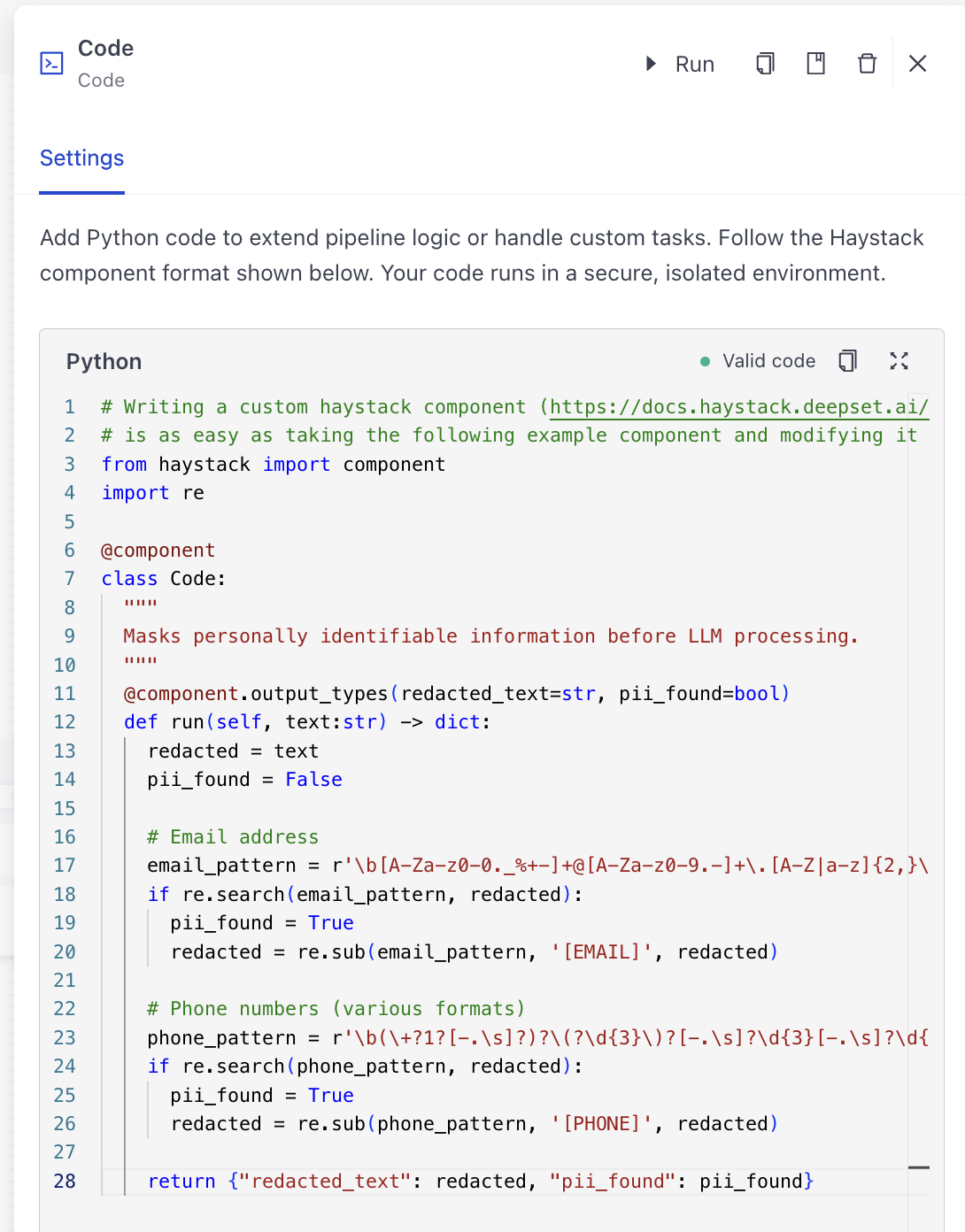
This is a query pipeline that masks sensitive information, like emails or phone numbers, before sending the data to an LLM. pii_redactor is a Code component with custom Python code that masks the sensitive information.
# haystack-pipeline
components:
  pii_redactor:
    type: deepset_cloud_custom_nodes.code.code_component.Code
    init_parameters:
      code: |
        import re
        from haystack import component

        @component
        class Code:
            """Masks personally identifiable information before LLM processing."""

            @component.output_types(redacted_text=str, pii_found=bool)
            def run(self, text: str) -> dict:
                redacted = text
                pii_found = False

                # Email addresses
                email_pattern = r'\b[A-Za-z0-9._%+-]+@[A-Za-z0-9.-]+\.[A-Z|a-z]{2,}\b'
                if re.search(email_pattern, redacted):
                    pii_found = True
                    redacted = re.sub(email_pattern, '[EMAIL]', redacted)

                # Phone numbers (various formats)
                phone_pattern = r'\b(\+?1?[-.\s]?)?\(?\d{3}\)?[-.\s]?\d{3}[-.\s]?\d{4}\b'
                if re.search(phone_pattern, redacted):
                    pii_found = True
                    redacted = re.sub(phone_pattern, '[PHONE]', redacted)

                return {"redacted_text": redacted, "pii_found": pii_found}

  prompt_builder:
    type: haystack.components.builders.prompt_builder.PromptBuilder
    init_parameters:
      template: |
        Help the user with their request: {{ query }}

  llm:
    type: haystack.components.generators.chat.openai.OpenAIChatGenerator
    init_parameters:
      model: gpt-5.4-mini
      api_key:
        type: env_var
        env_vars:
        - OPENAI_API_KEY
        strict: false

  answer_builder:
    type: haystack.components.builders.answer_builder.AnswerBuilder
    init_parameters: {}

connections:
- sender: pii_redactor.redacted_text
  receiver: prompt_builder.query
- sender: prompt_builder.prompt
  receiver: llm.messages
- sender: llm.replies
  receiver: answer_builder.replies

inputs:
  query:
  - answer_builder.query
  - pii_redactor.text

outputs:
  answers: answer_builder.answers

max_runs_per_component: 100

metadata: {}
This is what the component looks like in the Builder:
Parameters
Inputs
You define the inputs in the run() method of your inline component. Whatever arguments you declare become the component's inputs. Make sure their types match the output types of the components you want to connect to.
Outputs
You define the outputs using the @component.output_types decorator on your run() method. Whatever output types you declare become the component's outputs. Make sure their types match the input types of the components you want to connect to.
Init Parameters
These are the parameters you can configure in Pipeline Builder:
| Parameter | Type | Default | Description |
|---|---|---|---|
| code | str | Python source that defines exactly one class decorated with @component. The class must expose a run() method. If the class defines __init__ parameters, they appear on the Advanced tab in the configuration panel. | |
| input_names | List[str] | Names of the input variables for the component, corresponding to the parameters of the run() method. | |
| output_names | List[str] | Names of the output variables for the component, corresponding to the values declared in @component.output_types. |
Run Method Parameters
These are the parameters you can configure for the component's run() method. This means you can pass these parameters at query time through the API, in Playground, or when running a job. For details, see Modify Pipeline Parameters at Query Time.
| Parameter | Type | Default | Description |
|---|---|---|---|
| Inputs defined in your code | Dynamic | Inherited from the wrapped component | Whatever arguments your inline component declares become keyword arguments for run(). Set them the same way you would configure any other component parameter. |
Troubleshooting
- "No Haystack component found" error: Add the
@componentdecorator to your class and keep only one component definition inside thecodestring. - Type errors during
run(): Ensure upstream nodes send the exact data types your inline component expects. Mismatched socket names or missing keyword arguments raiseTypeErrorbecauseCodeforwards inputs directly to the wrapped component.
Performance Considerations
Codeexecutes your snippet once during pipeline load, so heavy imports or long module-level logic slow down startup but not per-request execution.- The inline component runs synchronously with the rest of the pipeline. Complex logic in
run()increases latency in lockstep. - Treat the
codefield like executable configuration. Store only trusted code and monitor version control changes to keep track of what runs inside your pipelines.
Related Information
Was this page helpful?