Manage Pipeline Versions
With versions, you can try different pipeline configurations without losing your past work. Currently, versions are available for query pipelines.
About This Task
Use pipeline versions to experiment with different configurations while keeping your previous work safe. When you work on a pipeline without saving it, it's a draft. Each time you make changes and save your pipeline, a new version is created. You can compare versions, restore previous configurations, and deploy specific versions when you're ready.
The current pipeline draft automatically becomes a new version when you:
- Save changes in Builder
- Deploy a pipeline
- Restore a previous version
- Update a prompt in Prompt Explorer
Each version includes the complete pipeline configuration and metadata about when it was created and by whom. If you duplicate a pipeline, its version history is not copied to the new pipeline.
Version Status Tags
Versions in the list can show the following status tags:
- Editing — the version currently open for editing.
- Deployed (green) — the version currently deployed and serving requests.
- Default (gold star) — the version used by serverless inference endpoints when a request specifies a pipeline by name or ID but does not specify a particular version.
Create a New Draft When One Already Exists
Only one draft can be active for a pipeline at a time. If you create a new draft when one already exists, the existing draft is automatically finalized (saved as a numbered version) and a new draft is created in its place.
If the existing draft is currently being edited by another user, you'll see a 409 error: "The current draft is being edited by another user." Wait until the other user finishes editing (or until their 60-second edit lock expires) and then try again.
Restore a Version
To restore a version:
-
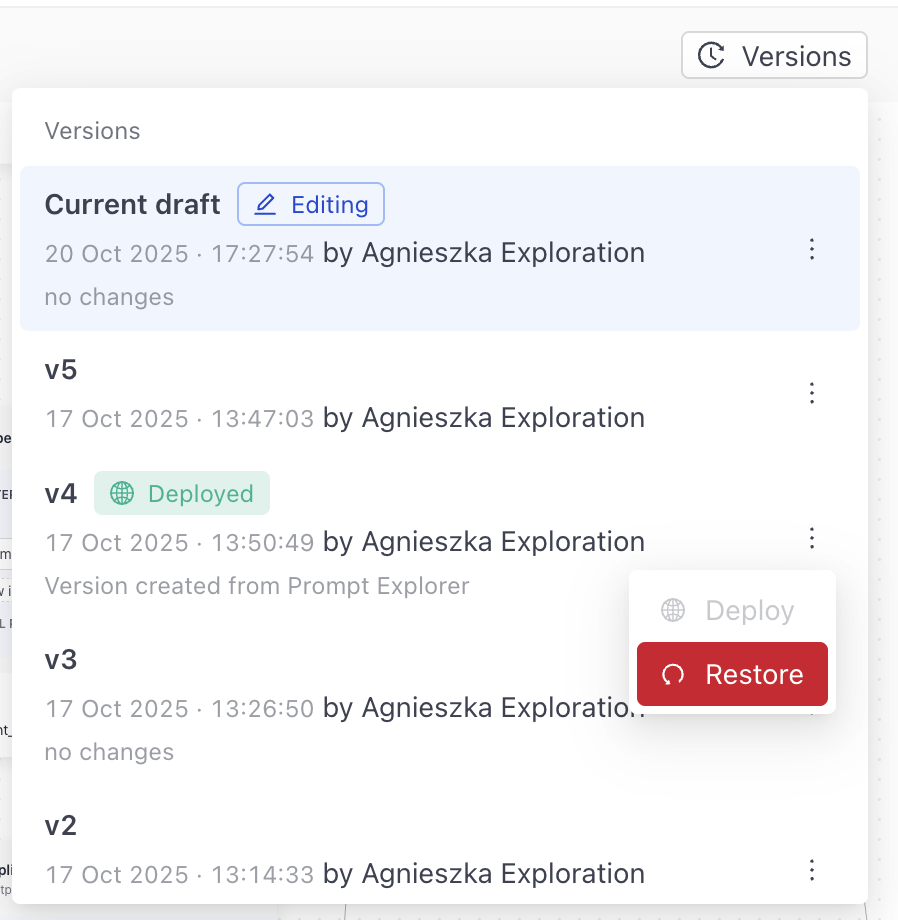
When editing a pipeline in Builder, click Versions.

-
Find the version you want to restore, click More Actions next to it, and click Restore.
-
Confirm that you want to restore the version. Your current work is saved as a new version and the restored version opens for editing.
Publish a Version
When you publish a pipeline, it publishes the latest version by default. To publish a specifc version, restore it:
- When editing a pipeline in Builder, click Versions.
- Find the version you want to publish, click More Actions next to it, and choose Restore.
- Confirm your choice. The restored version opens in Builder.
- Click Publish and confirm the version to publish.
Publishing also creates a new draft with the same content, so you can keep editing right away. The new draft doesn't copy the version description, which stays with the published version.
When you deploy a new version of a pipeline or redeploy an existing one, the version that's already running keeps handling queries until the new version deploys successfully. Your pipeline stays available the whole time. If the new deployment fails, the current version keeps running, so there's no downtime.
Finalize a Version
Finalizing converts a draft version into a permanent, numbered version. When a version is finalized, you can no longer edit it as a draft, but it remains available to deploy, restore, or set as default.
To finalize a draft version:
- When editing a pipeline in Builder, click Versions.
- Find the draft version you want to finalize, click More Actions next to it, and click Finalize.
deepset saves the version and automatically creates a new draft with the same content, so you can keep editing right away. The new draft doesn't copy the version description, which stays with the finalized version.
Set a Version as Default
The default version is used by serverless inference endpoints when a request identifies a pipeline by name or ID but does not specify a particular version ID. You can set only non-draft versions as default.
To set a version as default:
- When editing a pipeline in Builder, click Versions.
- Find the version you want to make the default, click More Actions next to it, and click Set as default.
The version is marked with a gold star Default tag in the versions list.
Compare Versions
To see what changed between versions:
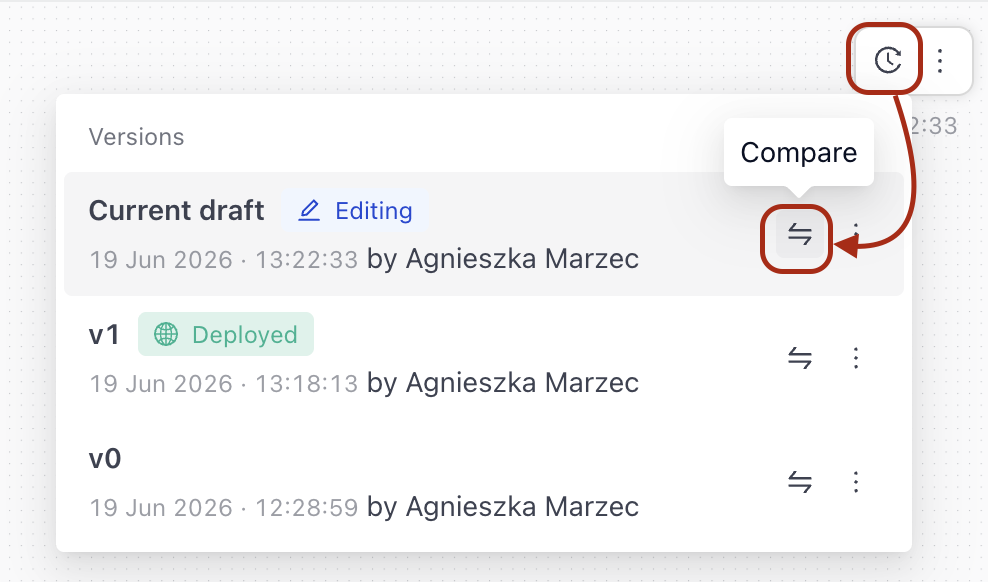
- In Builder, click Versions.
- Choose the version you want to compare with the current version and click the Compare icon. The differences are highlighted in the comparison view.
Related Information
Was this page helpful?