Troubleshoot Pipelines and Indexes
Diagnose and resolve common issues with pipelines and indexes.
Pipeline Issues
When creating or updating a pipeline, you may see validation errors that prevent deployment. Here are common errors and how to resolve them.
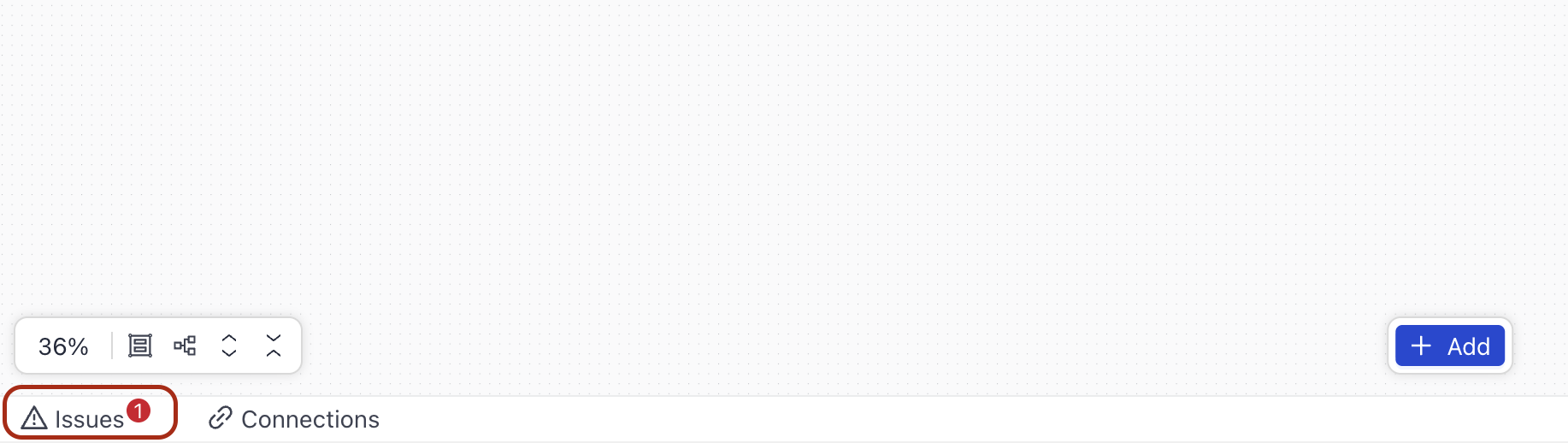
Use the global Issues panel in Builder. You can find it at the bottom of the canvas. Expand the panel to view all validation and runtime issues in one place. Click Inspect next to any issue to jump directly to the affected component or connection. Click Fix with AI to open the AI assistant, which reasons through the fix and can apply it for you.
Unconnected Model Provider
Symptoms: The Issues panel in Pipeline Builder shows a model connection issue for an LLM or Agent component.
What happens: When a component such as LLM or Agent is configured to use a model provider that isn't connected to Haystack Enterprise Platform, an issue appears in the Issues panel. The issue shows the name of the affected model and provider.
Components that use an embedded chat generator — such as LLMMetadataExtractor — are also checked for model connection status. If the configured provider is not connected, the Issues panel shows a warning for that component as well.
Solution:
- Open your pipeline in Pipeline Builder.
- At the bottom of Builder, click Issues to open the Issues panel.
- Find the model connection issue and click Connect next to it.
- Enter your API key and any other required details for the provider.
- Click Connect to save the integration.
The issue disappears once the provider is connected. For general information on connecting model providers, see Connect to Model and Service Providers.
Invalid Amazon Bedrock Model Identifier
Symptoms: Your pipeline returns an error similar to: "The provided model identifier is invalid."
What happens: Amazon Bedrock model IDs include a regional prefix (for example, us., eu., ap.) that must match the AWS region where your pipeline is deployed. If you configure a model ID with the wrong regional prefix — for example, using us.anthropic.claude-haiku-4-5-20251001-v1:0 in a deployment region that requires the eu. prefix — AWS returns a validation error (HTTP 400 ValidationException).
Solution:
- Open your pipeline in Pipeline Builder and find the component that uses the Amazon Bedrock model.
- Check the model ID configured in the component's settings.
- Update the model ID to use the correct regional prefix for your deployment region. For example:
- Use
eu.anthropic.claude-...for deployments in European regions. - Use
us.anthropic.claude-...for deployments in US regions. - Use
ap.anthropic.claude-...for deployments in Asia Pacific regions.
- Use
- For a full list of model IDs and supported regions, see Amazon Bedrock model IDs.
- Redeploy your pipeline.
For more information on setting up Amazon Bedrock models, see Use Amazon Bedrock Models.
Invalid or Missing Document Store Index
Symptoms: Deploying a pipeline fails with a validation error (HTTP 422) that mentions an index name or document store.
What happens: When you deploy a pipeline, the platform validates the index name configured in each document store component. If the index name is missing, empty, or does not match any index in your workspace, the deployment is rejected before it starts. This prevents a deployed service from running with a broken or unresolvable index.
Common causes:
- The document store component's
indexparameter is empty or set todefault. - The index name in the pipeline YAML refers to an index that doesn't exist in the current workspace.
- The index was renamed or deleted after the pipeline was last saved.
Solution:
- Open your pipeline in Pipeline Builder and find the document store component (for example, an OpenSearch or Elasticsearch retriever).
- Check the
indexparameter in the component's settings and make sure it contains a valid index name. - Go to Indexes and confirm that an index with that name exists in your workspace and is enabled.
- If the index was deleted or renamed, update the pipeline to reference the correct index name, then save and redeploy.
For information on creating and managing indexes, see the Indexes documentation.
Invalid Streaming Component Error
If your pipeline contains components that don't support streaming, this error is shown:
Error message: "Invalid streaming component - This pipeline contains a component that does not support streaming. Remove or replace the incompatible component to enable streaming."
Solution: To resolve this error:
- Identify which components in your pipeline don't support streaming.
- Either remove the incompatible component or replace it with a streaming-compatible alternative.
- For more information about streaming and compatible components, see Enable Streaming.
Unsupported Placeholder Reference
Symptoms: Validating or deploying a pipeline fails with an error whose code is PIPELINE_UNSUPPORTED_PLACEHOLDER_ERROR. The message names a specific ${VAR} placeholder found in your pipeline YAML.
What happens: A pipeline YAML can contain ${VAR} placeholders, but only a small, fixed set of them is resolved automatically — the connection details for your document store (for example, ${OPENSEARCH_HOST}, ${OPENSEARCH_PORT}, ${OPENSEARCH_USER}, ${OPENSEARCH_PASSWORD}, ${ELASTICSEARCH_API_KEY}, ${SEARCH_ENGINE_TYPE}). Any other ${VAR} reference — most commonly an attempt to reference a workspace secret this way — can't be resolved and previously caused the pipeline to fail only after deployment, when the container started. Validation now catches this earlier and rejects the pipeline before it's deployed, naming every unsupported placeholder it finds so you can fix them all at once.
This check only looks at configuration fields. Fields meant to hold free text or code — such as code, template, prompt, system_prompt, instructions, and description — are never scanned, so a ${...} string used intentionally in a Code component or a prompt template is not affected.
Solution:
- Open your pipeline in Pipeline Builder or the YAML editor and find the component that uses the reported placeholder.
- If you need to reference a workspace secret, remove the
${VAR}reference and configure the component to use a Haystackenv_var-type secret instead. This resolves the secret from the environment at runtime rather than by substituting it directly into the YAML. - Save and redeploy the pipeline.
Dependency Not Allowed
Symptoms: Validating or deploying a pipeline fails with an error whose code is PIPELINE_DEPENDENCY_NOT_ALLOWED_ERROR. The message points to a specific entry in the pipeline YAML dependencies list.
What happens: Pipeline YAML can include a dependencies block for extra Python packages. To keep pipeline environments secure and predictable, Haystack Enterprise Platform allows only approved package names. This check runs for both query and indexing pipeline YAML when you validate or deploy a pipeline.
Package names are matched regardless of casing, underscores, dots, or hyphens. Direct URL references, such as some-package @ https://example.com/package.whl, are never allowed. If a dependency is rejected, the error message includes only the package name, not the full requirement string.
Solution:
- Open your pipeline in Pipeline Builder or the YAML editor.
- Find the
dependenciesentry named in the validation error. - Remove the package or replace it with an approved package.
- If the entry uses a direct URL reference, replace it with a package name and version constraint instead.
- Save the pipeline, validate it again, and redeploy it.
OpenSearch Filter Missing Operator
Symptoms: Your pipeline returns an error like FilterError: 'operator' key missing when running a query with filters against an OpenSearch retriever.
What happens: OpenSearch retrievers such as OpenSearchBM25Retriever and OpenSearchHybridRetriever require filters to follow a structured format with three keys: field, operator, and value. Passing a flat dict — for example, {'year': 2024} — raises this error because the required operator key is missing.
Solution:
Update your filter to use the correct structured format:
{
  "field": "year",
  "operator": "==",
  "value": 2024
}
For combining multiple conditions, use a logical operator with a conditions list:
{
  "operator": "AND",
  "conditions": [
    {"field": "year", "operator": ">=", "value": 2020},
    {"field": "category", "operator": "==", "value": "news"}
  ]
}
Pipeline Builder Canvas Fails to Load
Symptoms: Instead of the visual canvas, Pipeline Builder shows an error message with Retry and Switch to YAML buttons.
What happens: Pipeline Builder requires several resources to render the visual canvas correctly — including component definitions, input/output metadata, and visualization data for your pipeline. If any of these fail to load, Builder shows an error state rather than an empty or broken canvas. This prevents you from accidentally working with an incomplete graph.
What you can do:
- Retry: Click Retry to reload the failed resources. Builder automatically retries a few times when a resource fails; the Retry button lets you trigger this manually after the automatic retries are exhausted.
- Switch to YAML: Click Switch to YAML to open the YAML editor. The YAML editor does not depend on the visual canvas resources, so you can still view and edit your pipeline configuration while the issue resolves.
Your pipeline is not affected by this error. The YAML configuration — the source of truth for your pipeline — remains intact. Autosave and manual save are paused while the canvas is in this state to prevent incomplete data from being saved.
If the error persists:
- Refresh the page and reopen the pipeline.
- Check your network connection and verify there are no connectivity issues.
- If the problem continues, contact deepset support.
Pipeline Stuck in Deploying
Symptoms: The pipeline status shows deploying for an extended period of time and does not change.
What happens: The platform automatically detects pipelines that have been deploying longer than expected and marks them as failed to deploy. This usually happens within a few minutes. Once the status changes to failed to deploy, you can redeploy the pipeline.
Solution:
- Wait a few minutes for the platform to detect the stuck deployment and update the status to failed to deploy.
- Once the status has changed, redeploy the pipeline. For details, see Deploy a Pipeline.
- If the pipeline fails to deploy again, check the pipeline YAML for configuration errors.
Pipeline Validation Times Out
Symptoms: Validating a pipeline returns an error with the message: "The Haystack Runtime timed out while validating the pipeline. Try again in a few moments."
What happens: When you validate a pipeline, the platform checks its configuration against the Haystack Runtime service. If that service takes too long to respond, the platform now returns this specific timeout message instead of a generic server error, so you know the issue is temporary rather than a problem with your pipeline configuration.
Solution:
- Wait a few moments and try validating your pipeline again.
- If the timeout keeps happening, check whether your pipeline configuration is unusually large or complex, since this can increase validation time.
- If the problem continues after several attempts, contact deepset support.
Pipeline Instance Stopped Before It Finished Responding
Symptoms: A pipeline run, a streaming request, or an MCP tool call fails with the error: "The pipeline instance stopped before it finished responding. Retry in a minute; if this keeps happening, contact deepset support."
What happens: The pipeline instance closed the connection before it returned a result. This is usually temporary. On the streaming endpoints, the message arrives as the final error event.
Solution:
- Wait a minute, then run the pipeline or send the request again.
- If the error keeps happening, contact deepset support.
Pipeline Performance Issues
Symptoms: Pipeline is slow or times out.
Possible causes and solutions:
- Model latency: Try switching to a faster model or enable GPU acceleration. For details, see Enable GPU Acceleration.
- Network bottlenecks: Check connectivity to external services and document stores.
Index Issues
Index Status: Partially Indexed
- Symptoms: All of the files were processed, but at least one of the files failed to be indexed.
- Possible causes and solutions:
- Missing dependencies: Ensure all required components and integrations are properly configured. If you're unsure about whether a component is correctly configured, you can run it in isolation to see if it works. For details, see Run Components and Pipelines in Builder.
- Invalid YAML configuration: Check your pipeline YAML for syntax errors.
- Corrupted files: Check if you your files are OK. You can use the get indexed files by status endpoint to see the status of the files.
- Retry indexing: Reindex the failed files:
- Go to Indexes and click the index that you're troubleshooting. This opens the Files page.
- Click More Actions next to a failed file and choose Retry Indexing.
Indexing Performance Issues
Symptoms: Indexing is slow or search results are poor.
Possible causes and solutions:
- Document preprocessing: Optimize document splitting and cleaning strategies.
- Embedding model choice: Consider choosing different embedding models for your content.
- Index settings: Adjust document store settings for better performance.
- Resource limits: Check the index's CPU usage, memory usage, and replica count on the Metrics tab to see whether it's running out of resources. For details, see Check Index Hardware Metrics.
Debugging Tools
For details on how to debug your pipelines, see Debugging Pipelines.
Related Information
Was this page helpful?