Use a Service as an AI Agent Model in n8n
Make one of your services the language model of an n8n AI Agent with the Haystack Enterprise Chat Model node.
About This Task
Instead of calling an LLM provider directly, the AI Agent sends each chat completion call to your service. The service runs its pipeline and returns the answer. The AI Agent keeps the conversation history in the memory you connect to it.
The Haystack Enterprise Chat Model node comes with the Haystack Enterprise AI package and uses the same credential.
Prerequisites
- The Haystack Enterprise AI node installed in n8n. For details, see Install the Node.
- A Haystack Enterprise credential in n8n, or the details to create one. For details, see Set Up Credentials.
- A service that answers questions. For details, see Create a Service.
Connect the Service to an AI Agent
- In your workflow, add n8n's built-in AI Agent node.
- On the AI Agent node, click the + icon under Chat Model.
- Select Haystack Enterprise Chat Model.
- Select your Haystack Enterprise credential, or create one. For details, see Set Up Credentials.
- In the node's parameters, select the Workspace Name and the Service Name.
- On the AI Agent node, click the + icon under Memory and choose a memory. For example, Simple Memory stores the conversation history locally in your n8n instance.
- Open the chat and send a question your service can answer. If the Agent replies with an answer from the service, the setup works.
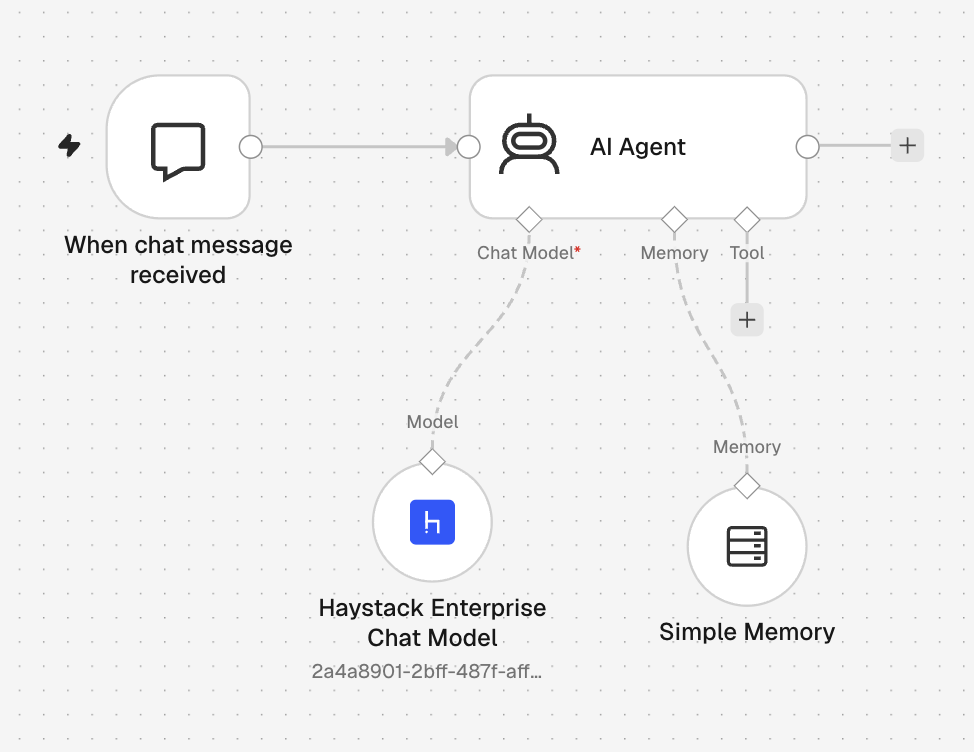
For a ready-made setup, import haystack-chat-model-agent-example.json. For import steps, see Start from an Example Workflow.
Troubleshooting
- The workspace or service list is empty or shows wrong values: n8n doesn't refresh the list by itself. Refresh your browser, or click the three-dot menu of the field and select Refresh List.
- Requests fail with an authorization error: Check that your API key or OAuth2 user has access to the workspace and the service.
Related Information
Was this page helpful?