WeaveConnector
Collect traces from your pipeline and send them to Weights & Biases (W&B). Use this component to integrate with the Weights & Biases Weave framework.
Key Features
- Sends pipeline traces to Weights & Biases Weave for analysis.
- No connections to other pipeline components required — just add it to your pipeline.
- Configurable pipeline name used as the Weave project name in W&B.
- Supports additional Weave initialization options via
weave_init_kwargs.
Configuration
- Drag the
WeaveConnectorcomponent onto the canvas from the Component Library. - Click on the component to open the configuration panel.
- On the General tab:
- Connect Haystack Enterprise Platform to W&B through the Integrations page. For details, see Use Weights & Biases Services.
- Set
pipeline_nameto the name of the pipeline you want to trace. This is used as the Weave project name in W&B.
- Go to the Advanced tab to configure
weave_init_kwargsif needed.
Connections
WeaveConnector doesn't connect to any other component. Add it to your pipeline without connecting it to other components.
Source Code
To check this component's source code, open weave_connector.py in the Haystack Core Integrations repository.
Usage Examples
Basic Configuration
  WeaveConnector:
    type: haystack_integrations.components.connectors.weave.weave_connector.WeaveConnector
    init_parameters:
      pipeline_name: RAG-Chat
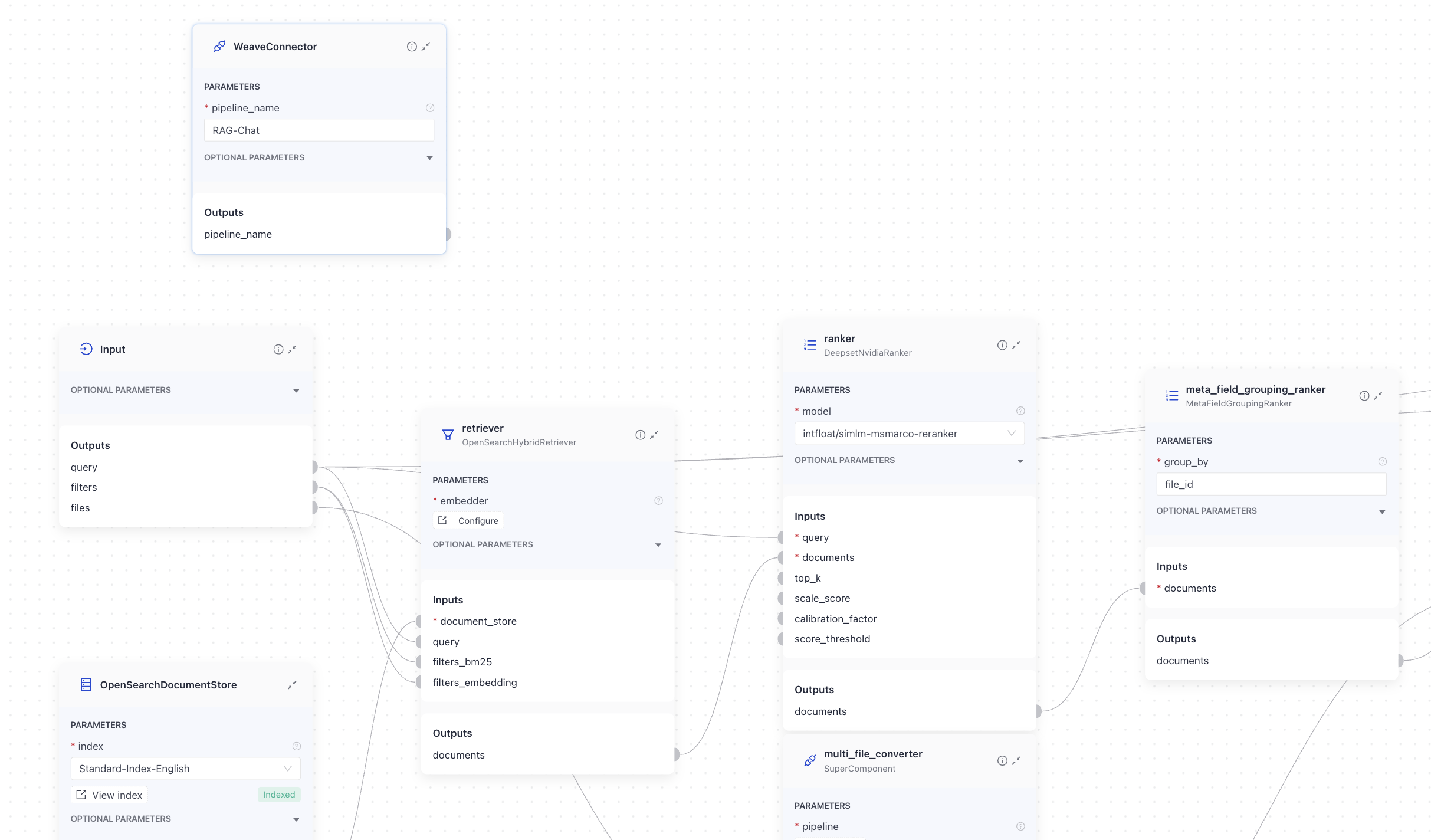
In this example, WeaveConnector is added to a RAG-Chat pipeline. It's in the query pipeline but is not connected to any other component. It's sending the traces of the RAG-Chat pipeline to Weights & Biases:
And here's the YAML configuration of the pipeline:
# haystack-pipeline
components:
  chat_summary_prompt_builder:
    type: haystack.components.builders.prompt_builder.PromptBuilder
    init_parameters:
      template: |-
        You are part of a chatbot.
        You receive a question (Current Question) and a chat history.
        Use the context from the chat history and reformulate the question so that it is suitable for retrieval augmented generation.
        If X is followed by Y, only ask for Y and do not repeat X again.
        If the question does not require any context from the chat history, output it unedited.
        Don't make questions too long, but short and precise.
        Stay as close as possible to the current question.
        Only output the new question, nothing else!

        {{ question }}

        New question:

  chat_summary_llm:
    type: haystack.components.generators.chat.openai.OpenAIChatGenerator
    init_parameters:
      api_key: {"type": "env_var", "env_vars": ["OPENAI_API_KEY"], "strict": false}
      model: "gpt-5.5"
      generation_kwargs:
        max_tokens: 650
        temperature: 0
        seed: 0

  replies_to_query:
    type: haystack.components.converters.output_adapter.OutputAdapter
    init_parameters:
      template: "{{ replies[0] }}"
      output_type: str

  bm25_retriever: # Selects the most similar documents from the document store
    type: haystack_integrations.components.retrievers.opensearch.bm25_retriever.OpenSearchBM25Retriever
    init_parameters:
      document_store:
        type: haystack_integrations.document_stores.opensearch.document_store.OpenSearchDocumentStore
        init_parameters:
          embedding_dim: 768
      top_k: 20 # The number of results to return

  query_embedder:
    type: deepset_cloud_custom_nodes.embedders.nvidia.text_embedder.DeepsetNvidiaTextEmbedder
    init_parameters:
      normalize_embeddings: true
      model: "intfloat/e5-base-v2"


  embedding_retriever: # Selects the most similar documents from the document store
    type: haystack_integrations.components.retrievers.opensearch.embedding_retriever.OpenSearchEmbeddingRetriever
    init_parameters:
      document_store:
        type: haystack_integrations.document_stores.opensearch.document_store.OpenSearchDocumentStore
        init_parameters:
          embedding_dim: 768
      top_k: 20 # The number of results to return

  document_joiner:
    type: haystack.components.joiners.document_joiner.DocumentJoiner
    init_parameters:
      join_mode: concatenate

  ranker:
    type: deepset_cloud_custom_nodes.rankers.nvidia.ranker.DeepsetNvidiaRanker
    init_parameters:
      model: intfloat/simlm-msmarco-reranker
      top_k: 8


  qa_prompt_builder:
    type: haystack.components.builders.prompt_builder.PromptBuilder
    init_parameters:
      template: |-
        You are a technical expert.
        You answer questions truthfully based on provided documents.
        Ignore typing errors in the question.
        For each document check whether it is related to the question.
        Only use documents that are related to the question to answer it.
        Ignore documents that are not related to the question.
        If the answer exists in several documents, summarize them.
        Only answer based on the documents provided. Don't make things up.
        Just output the structured, informative and precise answer and nothing else.
        If the documents can't answer the question, say so.
        Always use references in the form [NUMBER OF DOCUMENT] when using information from a document, e.g. [3] for Document[3].
        Never name the documents, only enter a number in square brackets as a reference.
        The reference must only refer to the number that comes in square brackets after the document.
        Otherwise, do not use brackets in your answer and reference ONLY the number of the document without mentioning the word document.
        These are the documents:
        {% for document in documents %}
        Document[{{ loop.index }}]:
        {{ document.content }}
        {% endfor %}

        Question: {{ question }}
        Answer:

  qa_llm:
    type: haystack.components.generators.chat.openai.OpenAIChatGenerator
    init_parameters:
      api_key: {"type": "env_var", "env_vars": ["OPENAI_API_KEY"], "strict": false}
      model: "gpt-5.5"
      generation_kwargs:
        max_tokens: 650
        temperature: 0
        seed: 0

  answer_builder:
    type: deepset_cloud_custom_nodes.augmenters.deepset_answer_builder.DeepsetAnswerBuilder
    init_parameters:
      reference_pattern: acm

  WeaveConnector:
    type: haystack_integrations.components.connectors.weave.weave_connector.WeaveConnector
    init_parameters:
      pipeline_name: RAG-Chat

connections:  # Defines how the components are connected
- sender: chat_summary_prompt_builder.prompt
  receiver: chat_summary_llm.messages
- sender: chat_summary_llm.replies
  receiver: replies_to_query.replies
- sender: replies_to_query.output
  receiver: bm25_retriever.query
- sender: replies_to_query.output
  receiver: query_embedder.text
- sender: replies_to_query.output
  receiver: ranker.query
- sender: replies_to_query.output
  receiver: qa_prompt_builder.question
- sender: replies_to_query.output
  receiver: answer_builder.query
- sender: bm25_retriever.documents
  receiver: document_joiner.documents
- sender: query_embedder.embedding
  receiver: embedding_retriever.query_embedding
- sender: embedding_retriever.documents
  receiver: document_joiner.documents
- sender: document_joiner.documents
  receiver: ranker.documents
- sender: ranker.documents
  receiver: qa_prompt_builder.documents
- sender: ranker.documents
  receiver: answer_builder.documents
- sender: qa_prompt_builder.prompt
  receiver: qa_llm.messages
- sender: qa_prompt_builder.prompt
  receiver: answer_builder.prompt
- sender: qa_llm.replies
  receiver: answer_builder.replies

inputs:  # Define the inputs for your pipeline
  query:  # These components will receive the query as input
  - "chat_summary_prompt_builder.question"
  filters:  # These components will receive a potential query filter as input
  - "bm25_retriever.filters"
  - "embedding_retriever.filters"

outputs:  # Defines the output of your pipeline
  documents: "ranker.documents"  # The output of the pipeline is the retrieved documents
  answers: "answer_builder.answers"  # The output of the pipeline is the generated answers

max_runs_per_component: 100

metadata: {}
Parameters
Inputs
This component takes no inputs.
Outputs
This component produces no outputs.
Init Parameters
These are the parameters you can configure in Pipeline Builder:
| Parameter | Type | Default | Description |
|---|---|---|---|
| pipeline_name | str | The name of the pipeline you want to trace. Used as the name of the Weave project in W&B. We recommend setting it to the name of the pipeline you're tracing. This will make it easier to identify where the traces come from, especially when managing multiple projects. | |
| weave_init_kwargs | dict[str, Any] | None | None | Additional keyword arguments for Weave. |
Run Method Parameters
This component has no run() method parameters.
Related Information
Was this page helpful?