Release 2026.8
Check August's updates.
Skills for Your Agents
You can now give your Agents skills. Skills are versioned folders of files, such as instructions and reference material, that an Agent reads while it runs to work through a task the way you want.
On the new Skills page under Resources, you can browse skills made by deepset, create your own skills, and scope them to a workspace or your whole organization. You can also connect your organization's GitHub repository so its skills appear in the library. Once a skill is available, you can attach it to an Agent from the Agent's settings.
For details, see Agent Skills and Manage Agent Skills.
Publish Your Pipelines Through Gateway
Your pipelines now have a stable home in production: Gateway. Inside Gateway, you publish a pipeline by creating a service, a fixed endpoint that never changes, even as you keep building and improving the pipeline behind it. Publish a new version whenever you're ready, and your callers stay connected the whole time.
- One endpoint, always. Iterate freely in the Builder without breaking what's live.
- Full history in one place. See every query, trace, and performance metric for your service.
- Hosting your way. Set replicas and idle timeout to match how much traffic your service needs.
We provide easy migration for pipelines you already deployed.
For details, see:
Know When Your Pipeline Is Warming Up
Streaming ping events can now include a phase field set to cold_start, which tells you that infrastructure for a newly scaled pipeline replica is still starting up. You can display this state in your client while continuing to ignore ping events as before. For details, see The ping event in Enable Streaming.
Pipeline Dependencies Block
You can now declare a specific Haystack Open Source version and add extra packages directly in your pipeline YAML using the dependencies key. When present, the platform automatically runs the pipeline in an isolated environment with exactly the packages you specify, with no changes needed to how you query the pipeline.
The platform validates the block when you save or deploy a pipeline, so version mismatches are caught early. For details on pipeline YAML, see Building Pipelines.
To learn more about Haystack Open Source and its relation to Haystack Platform, see Haystack Open Source.
Set the Haystack Version for a Pipeline
Choose the Haystack version your pipeline runs on from the pipeline settings. Go to Pipeline Settings and select a version from the Haystack Version list. Selecting a version pins your pipeline to that release; leaving it unset keeps your pipeline on the default supported version. For details, see Update Pipeline Settings.
Turn Off SSE Keep-Alive Comments for Streaming Requests
Streaming responses periodically send : keep-alive comment lines while a pipeline is idle, so the connection isn't dropped. If your client only parses data: lines and breaks on these comment lines, you can now send the X-Deepset-Stream-Keepalive: off request header on any streaming request to suppress them for that request. Omitting the header, or sending on, keeps the deployment's configured keep-alive behavior unchanged. Sending any other value returns a 400 error.
This header works on the pipeline search-stream and chat-stream endpoints and the deployment search-stream, chat-stream, and chat completions endpoints. For background on streaming responses and event types, see Enable Streaming.
Easier on the Eyes
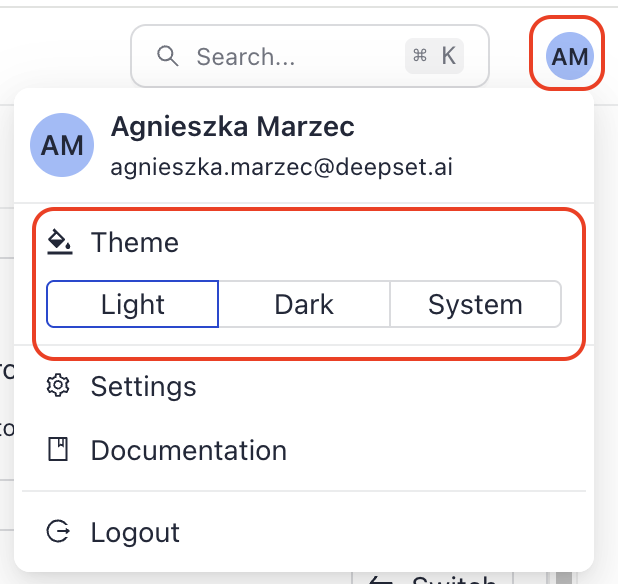
You can now use the Haystack Platform in dark or light. Click your profile icon and choose your theme: Light, Dark, or System to match your system's settings.
Redesigned Conditional Router
The Conditional Router component has a redesigned drawer editor and canvas card. In the drawer, each route now appears as a sortable If, Else if, or Else block that you edit directly as YAML, with a Valid or Invalid badge that flags issues like malformed Jinja2 delimiters, output type mismatches, and duplicate output names for that specific route. On the canvas, each route gets its own condition row and a dedicated output handle, so it's easier to see how routes map to downstream connections. Renaming or removing a route automatically updates any canvas connections that depend on it.
To try this feature, ask deepset to enable it for your organization. For details, see ConditionalRouter.
Self-Serve SSO Connections Management
Organization admins can now manage Single Sign-On (SSO) connections directly from Settings > Organization > SSO, without contacting support. Add a connection using a preset for your identity provider (Google Workspace, Okta, Generic OIDC, or Generic SAML), test it before saving, and edit, enable, disable, or delete it at any time. SSO is only visible to organization admins and is available on request. For details, see Enable Single Sign-On (SSO).
Was this page helpful?