Trace with Langfuse
Monitor your Haystack Platform pipelines with Langfuse.
About This Task
Langfuse is a powerful tool for observability and tracing in complex AI workflows. It captures detailed traces of your pipeline operations, making it easier to debug, monitor, and improve your applications.
The Haystack Enterprise Platform integrates with Langfuse using the LangfuseConnector. To get started, connect the platform to Langfuse with your API key. Then, simply add the LangfuseConnector to your pipelines to start collecting and sending traces to Langfuse.
Prerequisites
- You need the Langfuse public and secret API keys. You can get them from your Langfuse project settings. You must create new keys as the secret key can only be viewed and copied once, during creation.
- Create two secrets:
- One for the Langfuse secret key. Call this secret
LANGFUSE_SECRET_KEY. - One for the Langfuse public key. Call this secret
LANGFUSE_PUBLIC_KEY.
- One for the Langfuse secret key. Call this secret
For more information on secrets, see Add Secrets and Secrets and Integrations.
Use Langfuse
- Connect Haystack Enterprise Platform to Langfuse by creating two Langfuse secrets:
- In Haystack Enterprise Platform, click your profile icon in the top right corner and choose Settings.
- Depending on the scope of the secrets, go to Workspace or Organization secrets.
- Click Create Secret.
- Copy the secret key from your Langfuse project and paste it into the Value field.
- Type
LANGFUSE_SECRET_KEYas the secret key and save the secret. - Click Create Secret.
- Copy the public key from your Langfuse project and paste it into the Value field.
- Type
LANGFUSE_PUBLIC_KEYas the secret key and save the secret.
- Add the
LangfuseConnectorcomponent to the pipeline you want to trace but do not connect it to any other component. - Set the
nameparameter inLangfuseConnectorto your pipeline name and save the pipeline.
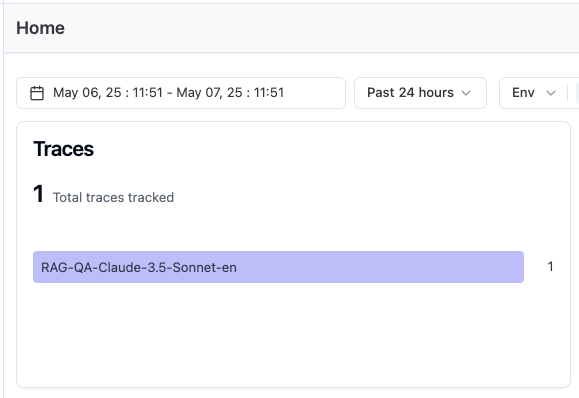
When you run a query with this pipeline, its traces will appear in your Langfuse project under Traces.
Example
This is an example of a RAG pipeline with Langfuse tracing enabled. LangfuseConnector is in the pipeline but it's not connected to any other component:
YAML configuration
# haystack-pipeline
components:
Agent:
type: haystack.components.agents.agent.Agent
init_parameters:
chat_generator:
init_parameters:
model: gpt-5.5
type: haystack.components.generators.chat.openai_responses.OpenAIResponsesChatGenerator
tools:
- type: haystack.tools.pipeline_tool.PipelineTool
data:
name: search_internal_it
description: >-
Search Acme Corp's internal IT documentation. Use this tool for
questions about internal
IT policies, procedures, and processes—such as requesting software licenses, getting VPN
access, IT support escalation, new employee IT setup, or any company-specific IT how-tos.
input_mapping:
filters:
- retriever.filters_bm25
- retriever.filters_embedding
files:
- multi_file_converter.sources
query:
- chat_summary_llm.question
output_mapping:
chat_summary_llm.last_message: updated_query
meta_field_grouping_ranker.documents: documents
qa_llm.messages: messages
pipeline:
pipeline_output_type: chat
components:
retriever:
type: haystack_integrations.components.retrievers.opensearch.open_search_hybrid_retriever.OpenSearchHybridRetriever
init_parameters:
document_store:
type: haystack_integrations.document_stores.opensearch.document_store.OpenSearchDocumentStore
init_parameters:
embedding_dim: 768
hosts:
index: internal-it-docs
max_chunk_bytes: 104857600
return_embedding: false
method:
mappings:
settings:
create_index: true
http_auth:
use_ssl:
verify_certs:
timeout:
top_k: 20
embedder:
type: deepset_cloud_custom_nodes.embedders.nvidia.text_embedder.DeepsetNvidiaTextEmbedder
init_parameters:
normalize_embeddings: true
model: intfloat/e5-base-v2
fuzziness: 0
ranker:
type: deepset_cloud_custom_nodes.rankers.nvidia.ranker.DeepsetNvidiaRanker
init_parameters:
model: tomaarsen/Qwen3-Reranker-0.6B-seq-cls
top_k: 8
meta_field_grouping_ranker:
type: haystack.components.rankers.meta_field_grouping_ranker.MetaFieldGroupingRanker
init_parameters:
group_by: file_id
subgroup_by:
sort_docs_by: split_id
multi_file_converter:
type: haystack.core.super_component.super_component.SuperComponent
init_parameters:
input_mapping:
sources:
- file_classifier.sources
is_pipeline_async: false
output_mapping:
tabular_joiner.documents: documents
pipeline:
components:
file_classifier:
type: haystack.components.routers.file_type_router.FileTypeRouter
init_parameters:
mime_types:
- text/plain
- application/pdf
- text/markdown
- text/html
- application/vnd.openxmlformats-officedocument.wordprocessingml.document
- application/vnd.openxmlformats-officedocument.presentationml.presentation
- application/vnd.openxmlformats-officedocument.spreadsheetml.sheet
- text/csv
text_converter:
type: haystack.components.converters.txt.TextFileToDocument
init_parameters:
encoding: utf-8
pdf_converter:
type: haystack.components.converters.pdfminer.PDFMinerToDocument
init_parameters:
line_overlap: 0.5
char_margin: 2
line_margin: 0.5
word_margin: 0.1
boxes_flow: 0.5
detect_vertical: true
all_texts: false
store_full_path: false
markdown_converter:
type: haystack.components.converters.txt.TextFileToDocument
init_parameters:
encoding: utf-8
html_converter:
type: haystack.components.converters.html.HTMLToDocument
init_parameters:
extraction_kwargs:
output_format: markdown
target_language:
include_tables: true
include_links: true
docx_converter:
type: haystack.components.converters.docx.DOCXToDocument
init_parameters:
link_format: markdown
pptx_converter:
type: haystack.components.converters.pptx.PPTXToDocument
init_parameters: {}
xlsx_converter:
type: haystack.components.converters.xlsx.XLSXToDocument
init_parameters: {}
csv_converter:
type: haystack.components.converters.csv.CSVToDocument
init_parameters:
encoding: utf-8
splitter:
type: haystack.components.preprocessors.document_splitter.DocumentSplitter
init_parameters:
split_by: word
split_length: 250
split_overlap: 30
respect_sentence_boundary: true
language: en
tabular_joiner:
type: haystack.components.joiners.document_joiner.DocumentJoiner
init_parameters:
join_mode: concatenate
sort_by_score: false
connections:
- sender: file_classifier.text/plain
receiver: text_converter.sources
- sender: file_classifier.application/pdf
receiver: pdf_converter.sources
- sender: file_classifier.text/markdown
receiver: markdown_converter.sources
- sender: file_classifier.text/html
receiver: html_converter.sources
- sender: file_classifier.application/vnd.openxmlformats-officedocument.wordprocessingml.document
receiver: docx_converter.sources
- sender: file_classifier.application/vnd.openxmlformats-officedocument.presentationml.presentation
receiver: pptx_converter.sources
- sender: file_classifier.application/vnd.openxmlformats-officedocument.spreadsheetml.sheet
receiver: xlsx_converter.sources
- sender: file_classifier.text/csv
receiver: csv_converter.sources
- sender: text_converter.documents
receiver: splitter.documents
- sender: pdf_converter.documents
receiver: splitter.documents
- sender: markdown_converter.documents
receiver: splitter.documents
- sender: html_converter.documents
receiver: splitter.documents
- sender: pptx_converter.documents
receiver: splitter.documents
- sender: docx_converter.documents
receiver: splitter.documents
- sender: xlsx_converter.documents
receiver: tabular_joiner.documents
- sender: csv_converter.documents
receiver: tabular_joiner.documents
- sender: splitter.documents
receiver: tabular_joiner.documents
chat_summary_llm:
type: haystack.components.generators.chat.llm.LLM
init_parameters:
chat_generator:
init_parameters:
model: gpt-5.4
type: haystack.components.generators.chat.openai_responses.OpenAIResponsesChatGenerator
system_prompt:
user_prompt: >-
{% message role="user" %}
You are part of a chatbot.
You receive a question (Current Question) and a chat
history.
Use the context from the chat history and reformulate the
question so that it is suitable for retrieval augmented
generation.
If X is followed by Y, only ask for Y and do not repeat X
again.
If the question does not require any context from the chat
history, output it unedited.
Don't make questions too long, but short and precise.
Stay as close as possible to the current question.
Only output the new question, nothing else!
{{ question }}
New question:
{% endmessage %}
required_variables: "*"
streaming_callback:
qa_llm:
type: haystack.components.generators.chat.llm.LLM
init_parameters:
chat_generator:
init_parameters:
model: gpt-5.4
type: haystack.components.generators.chat.openai_responses.OpenAIResponsesChatGenerator
system_prompt: ""
user_prompt: >-
{% message role="user" %}
You are a technical expert.
You answer questions truthfully based on provided documents.
Ignore typing errors in the question.
For each document check whether it is related to the
question.
Only use documents that are related to the question to
answer it.
Ignore documents that are not related to the question.
If the answer exists in several documents, summarize them.
Only answer based on the documents provided. Don't make
things up.
Just output the structured, informative and precise answer
and nothing else.
If the documents can't answer the question, say so.
Always use references in the form [NUMBER OF DOCUMENT] when
using information from a document, e.g. [3] for Document [3]
.
Never name the documents, only enter a number in square
brackets as a reference.
The reference must only refer to the number that comes in
square brackets after the document.
Otherwise, do not use brackets in your answer and reference
ONLY the number of the document without mentioning the word
document.
These are the documents:
{%- if documents|length > 0 %}
{%- for document in documents %}
Document [{{ loop.index }}] :
Name of Source File: {{ document.meta.file_name }}
{{ document.content }}
{% endfor -%}
{%- else %}
No relevant documents found.
Respond with "Sorry, no matching documents were found,
please adjust the filters or try a different question."
{% endif %}
Question: {{ question.text }}
Answer:
{% endmessage %}
required_variables: "*"
streaming_callback:
connections:
- sender: retriever.documents
receiver: ranker.documents
- sender: multi_file_converter.documents
receiver: meta_field_grouping_ranker.documents
- sender: ranker.documents
receiver: meta_field_grouping_ranker.documents
- sender: chat_summary_llm.last_message
receiver: retriever.query
- sender: chat_summary_llm.last_message
receiver: ranker.query
- sender: chat_summary_llm.last_message
receiver: qa_llm.question
- sender: meta_field_grouping_ranker.documents
receiver: qa_llm.documents
max_runs_per_component: 100
metadata: {}
is_pipeline_async: false
inputs_from_state: {}
outputs_to_string: {}
outputs_to_state: {}
_meta:
name: search_internal_it
description: >-
Search Acme Corp's internal IT documentation. Use this tool for
questions about internal
IT policies, procedures, and processes—such as requesting software licenses, getting VPN
access, IT support escalation, new employee IT setup, or any company-specific IT how-tos.
tool_id:
pipeline_version_id: 5916d707-f550-4b0a-a4d1-6be06a471f98
- type: haystack.tools.pipeline_tool.PipelineTool
data:
name: search_vendor_docs
description: >-
Search vendor software documentation. Use this tool for questions
about how to use
specific applications and products—such as Zoom features, Microsoft 365, setting up
email on mobile, or any other software how-to questions.
input_mapping:
filters:
- retriever.filters_bm25
- retriever.filters_embedding
files:
- multi_file_converter.sources
query:
- chat_summary_llm.question
output_mapping:
chat_summary_llm.last_message: updated_query
meta_field_grouping_ranker.documents: documents
qa_llm.messages: messages
pipeline:
pipeline_output_type: chat
components:
retriever:
type: haystack_integrations.components.retrievers.opensearch.open_search_hybrid_retriever.OpenSearchHybridRetriever
init_parameters:
document_store:
type: haystack_integrations.document_stores.opensearch.document_store.OpenSearchDocumentStore
init_parameters:
embedding_dim: 768
hosts:
index: vendor-documents
max_chunk_bytes: 104857600
return_embedding: false
method:
mappings:
settings:
create_index: true
http_auth:
use_ssl:
verify_certs:
timeout:
top_k: 20
embedder:
type: deepset_cloud_custom_nodes.embedders.nvidia.text_embedder.DeepsetNvidiaTextEmbedder
init_parameters:
normalize_embeddings: true
model: intfloat/e5-base-v2
fuzziness: 0
ranker:
type: deepset_cloud_custom_nodes.rankers.nvidia.ranker.DeepsetNvidiaRanker
init_parameters:
model: tomaarsen/Qwen3-Reranker-0.6B-seq-cls
top_k: 8
meta_field_grouping_ranker:
type: haystack.components.rankers.meta_field_grouping_ranker.MetaFieldGroupingRanker
init_parameters:
group_by: file_id
subgroup_by:
sort_docs_by: split_id
multi_file_converter:
type: haystack.core.super_component.super_component.SuperComponent
init_parameters:
input_mapping:
sources:
- file_classifier.sources
is_pipeline_async: false
output_mapping:
tabular_joiner.documents: documents
pipeline:
components:
file_classifier:
type: haystack.components.routers.file_type_router.FileTypeRouter
init_parameters:
mime_types:
- text/plain
- application/pdf
- text/markdown
- text/html
- application/vnd.openxmlformats-officedocument.wordprocessingml.document
- application/vnd.openxmlformats-officedocument.presentationml.presentation
- application/vnd.openxmlformats-officedocument.spreadsheetml.sheet
- text/csv
text_converter:
type: haystack.components.converters.txt.TextFileToDocument
init_parameters:
encoding: utf-8
pdf_converter:
type: haystack.components.converters.pdfminer.PDFMinerToDocument
init_parameters:
line_overlap: 0.5
char_margin: 2
line_margin: 0.5
word_margin: 0.1
boxes_flow: 0.5
detect_vertical: true
all_texts: false
store_full_path: false
markdown_converter:
type: haystack.components.converters.txt.TextFileToDocument
init_parameters:
encoding: utf-8
html_converter:
type: haystack.components.converters.html.HTMLToDocument
init_parameters:
extraction_kwargs:
output_format: markdown
target_language:
include_tables: true
include_links: true
docx_converter:
type: haystack.components.converters.docx.DOCXToDocument
init_parameters:
link_format: markdown
pptx_converter:
type: haystack.components.converters.pptx.PPTXToDocument
init_parameters: {}
xlsx_converter:
type: haystack.components.converters.xlsx.XLSXToDocument
init_parameters: {}
csv_converter:
type: haystack.components.converters.csv.CSVToDocument
init_parameters:
encoding: utf-8
splitter:
type: haystack.components.preprocessors.document_splitter.DocumentSplitter
init_parameters:
split_by: word
split_length: 250
split_overlap: 30
respect_sentence_boundary: true
language: en
tabular_joiner:
type: haystack.components.joiners.document_joiner.DocumentJoiner
init_parameters:
join_mode: concatenate
sort_by_score: false
connections:
- sender: file_classifier.text/plain
receiver: text_converter.sources
- sender: file_classifier.application/pdf
receiver: pdf_converter.sources
- sender: file_classifier.text/markdown
receiver: markdown_converter.sources
- sender: file_classifier.text/html
receiver: html_converter.sources
- sender: file_classifier.application/vnd.openxmlformats-officedocument.wordprocessingml.document
receiver: docx_converter.sources
- sender: file_classifier.application/vnd.openxmlformats-officedocument.presentationml.presentation
receiver: pptx_converter.sources
- sender: file_classifier.application/vnd.openxmlformats-officedocument.spreadsheetml.sheet
receiver: xlsx_converter.sources
- sender: file_classifier.text/csv
receiver: csv_converter.sources
- sender: text_converter.documents
receiver: splitter.documents
- sender: pdf_converter.documents
receiver: splitter.documents
- sender: markdown_converter.documents
receiver: splitter.documents
- sender: html_converter.documents
receiver: splitter.documents
- sender: pptx_converter.documents
receiver: splitter.documents
- sender: docx_converter.documents
receiver: splitter.documents
- sender: xlsx_converter.documents
receiver: tabular_joiner.documents
- sender: csv_converter.documents
receiver: tabular_joiner.documents
- sender: splitter.documents
receiver: tabular_joiner.documents
chat_summary_llm:
type: haystack.components.generators.chat.llm.LLM
init_parameters:
chat_generator:
init_parameters:
model: gpt-5.4
type: haystack.components.generators.chat.openai_responses.OpenAIResponsesChatGenerator
system_prompt:
user_prompt: >-
{% message role="user" %}
You are part of a chatbot.
You receive a question (Current Question) and a chat
history.
Use the context from the chat history and reformulate the
question so that it is suitable for retrieval augmented
generation.
If X is followed by Y, only ask for Y and do not repeat X
again.
If the question does not require any context from the chat
history, output it unedited.
Don't make questions too long, but short and precise.
Stay as close as possible to the current question.
Only output the new question, nothing else!
{{ question }}
New question:
{% endmessage %}
required_variables: "*"
streaming_callback:
qa_llm:
type: haystack.components.generators.chat.llm.LLM
init_parameters:
chat_generator:
init_parameters:
model: gpt-5.4
type: haystack.components.generators.chat.openai_responses.OpenAIResponsesChatGenerator
system_prompt: ""
user_prompt: >-
{% message role="user" %}
You are a technical expert.
You answer questions truthfully based on provided documents.
Ignore typing errors in the question.
For each document check whether it is related to the
question.
Only use documents that are related to the question to
answer it.
Ignore documents that are not related to the question.
If the answer exists in several documents, summarize them.
Only answer based on the documents provided. Don't make
things up.
Just output the structured, informative and precise answer
and nothing else.
If the documents can't answer the question, say so.
Always use references in the form [NUMBER OF DOCUMENT] when
using information from a document, e.g. [3] for Document [3]
.
Never name the documents, only enter a number in square
brackets as a reference.
The reference must only refer to the number that comes in
square brackets after the document.
Otherwise, do not use brackets in your answer and reference
ONLY the number of the document without mentioning the word
document.
These are the documents:
{%- if documents|length > 0 %}
{%- for document in documents %}
Document [{{ loop.index }}] :
Name of Source File: {{ document.meta.file_name }}
{{ document.content }}
{% endfor -%}
{%- else %}
No relevant documents found.
Respond with "Sorry, no matching documents were found,
please adjust the filters or try a different question."
{% endif %}
Question: {{ question.text }}
Answer:
{% endmessage %}
required_variables: "*"
streaming_callback:
connections:
- sender: retriever.documents
receiver: ranker.documents
- sender: multi_file_converter.documents
receiver: meta_field_grouping_ranker.documents
- sender: ranker.documents
receiver: meta_field_grouping_ranker.documents
- sender: chat_summary_llm.last_message
receiver: retriever.query
- sender: chat_summary_llm.last_message
receiver: ranker.query
- sender: chat_summary_llm.last_message
receiver: qa_llm.question
- sender: meta_field_grouping_ranker.documents
receiver: qa_llm.documents
max_runs_per_component: 100
metadata: {}
is_pipeline_async: false
inputs_from_state: {}
outputs_to_string: {}
outputs_to_state: {}
_meta:
name: search_vendor_docs
description: >-
Search vendor software documentation. Use this tool for questions
about how to use
specific applications and products—such as Zoom features, Microsoft 365, setting up
email on mobile, or any other software how-to questions.
tool_id:
pipeline_version_id: c164dc6d-3b28-406e-8766-a47b19cbee65
system_prompt: >-
{% message role="system" %}
You are an IT helpdesk assistant for Corp. You help employees solve IT
problems and answer questions about IT processes and software.
You have two tools:
- search_internal_it: Use this for questions about Acme Corp's internal
IT policies and procedures—requesting software, getting VPN access, IT
support processes, internal how-tos.
- search_vendor_docs: Use this for questions about how to use software
products—Zoom, Microsoft 365, and other applications.
When a question involves both internal processes and software (for
example, "I can't connect to Teams because my VPN is blocking it"), use
both tools before answering.
Base your answer only on the information you find. Cite which documents
you used. If you can't find the answer in either knowledge base, say so
clearly and tell the employee to contact the IT helpdesk directly at
helpdesk@acmecorp.internal.
{% endmessage %}
user_prompt:
required_variables:
exit_conditions:
state_schema: {}
max_agent_steps: 100
streaming_callback:
raise_on_tool_invocation_failure: false
LangfuseConnector:
type: haystack_integrations.components.connectors.langfuse.langfuse_connector.LangfuseConnector
init_parameters:
name: helpdesk-agent
public: false
public_key:
type: env_var
env_vars:
- LANGFUSE_PUBLIC_KEY
strict: false
secret_key:
type: env_var
env_vars:
- LANGFUSE_SECRET_KEY
strict: false
httpx_client:
span_handler:
host:
langfuse_client_kwargs:
max_runs_per_component: 100
metadata: {}
inputs:
messages:
- Agent.messages
filters: []
files: []
outputs:
answers:
documents:
messages: Agent.last_message
Was this page helpful?