DeepsetNvidiaTextEmbedder
Embed strings of text using embedding models by NVIDIA Triton on optimized hardware.
Basic Information
- Type:
deepset_cloud_custom_nodes.embedders.nvidia.text_embedder.DeepsetNvidiaTextEmbedder - Components it most often connects with:
- Input:
DeepsetNvidiaTextEmbedderreceives the query to embed fromInput. - Embedding Retrievers:
DeepsetNvidiaTextEmbeddercan send the embedded query to an Embedding Retriever that uses it to find matching documents.
- Input:
Inputs
| Parameter | Type | Default | Description |
|---|---|---|---|
| text | str | The text to embed. |
Outputs
| Parameter | Type | Default | Description |
|---|---|---|---|
| embedding | List[float] | Embedding of the text. | |
| meta | Dict[str, Any] | Metadata on usage statistics. |
Overview
NvidiaTextEmbedder uses NVIDIA Triton models to embed a string, such as a query. This is useful if your pipeline performs vector-based retrieval. The Embedding Retriever can then used the embedded query to find matching documents in the document store.
This component runs on optimized hardware in Haystack Enterprise Platform, which means it doesn't work if you export it to a local Python file. If you're planning to export, use SentenceTransformersTextEmbedder instead.
The model list on the component card shows only the models loaded in your region. If a saved pipeline uses a model that isn't loaded in your region, the model stays selectable and is tagged unavailable in this region. Switch to an available model in the model parameter. For new pipelines, choose an available model from the start. In a query pipeline, use the same model that embedded your indexed documents, because query and document embeddings must come from the same model.
Choose from the embedders deepset hosts in your region. You can pick any hosted model that the component supports, except that models marked as experimental appear only if experimental models are enabled for you. Legacy models are never offered for a new pick. If deepset's list of hosted models isn't available, the dropdown shows the models loaded in your region. A pipeline that already uses a legacy model keeps it, tagged legacy. To move to a supported model, pick another model in the model parameter and re-index your documents if they were embedded with the old one.
::: info Embedding Models in Pipelines and Indexes
The embedding model you use to embed documents in your index must be the same as the embedding model you use to embed the query in your pipeline.
This means the embedders for your indexes and pipelines must match. For example, if you use CohereDocumentEmbedder to embed your documents, you should use CohereTextEmbedder with the same model to embed your queries.
If the query model's name differs from the index model's name, for example an ONNX variant of the same model, the platform shows a warning in the Issues panel but still lets you save and deploy the pipeline. Make sure both models produce compatible embeddings. If the index has no embedding model, validation fails with an error.
:::
Usage Examples
Basic Configuration
  DeepsetNvidiaTextEmbedder:
    type: deepset_cloud_custom_nodes.embedders.nvidia.text_embedder.DeepsetNvidiaTextEmbedder
    init_parameters:
      model: intfloat/multilingual-e5-base
      prefix: ''
      suffix: ''
      normalize_embeddings: true
Using the Component in a Pipeline
This is an example of a DeepsetNvidiaTextEmbedder used in a query pipeline. It receives the text to embed from Input and then sends the embedded query to OpenSearchEmbeddingRetriever:
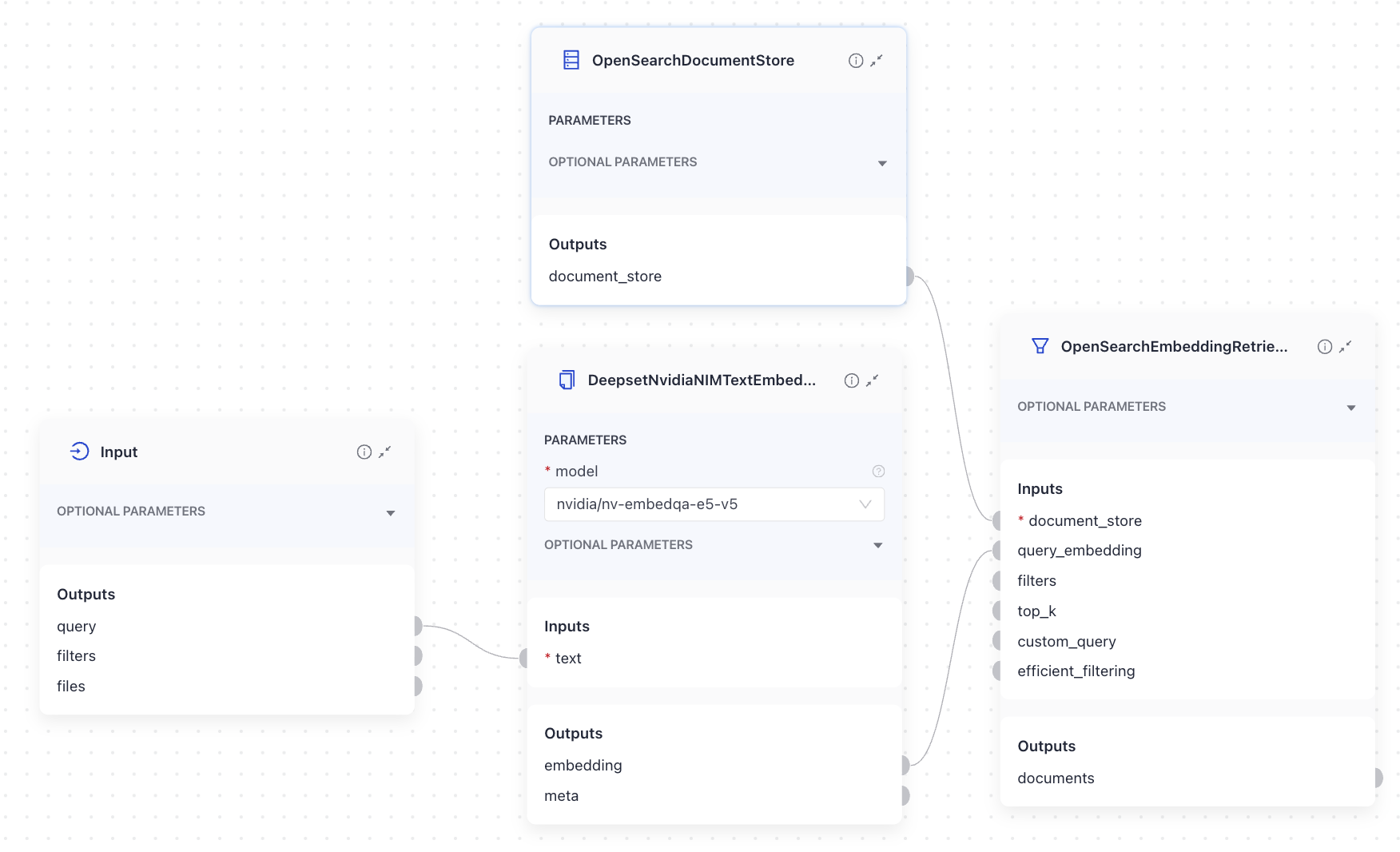
Here's the YAML configuration:
# haystack-pipeline
components:
  DeepsetNvidiaTextEmbedder:
    type: deepset_cloud_custom_nodes.embedders.nvidia.text_embedder.DeepsetNvidiaTextEmbedder
    init_parameters:
      model: intfloat/multilingual-e5-base
      prefix: ''
      suffix: ''
      truncate: null
      normalize_embeddings: true
      timeout: null
      backend_kwargs: null
  OpenSearchEmbeddingRetriever:
    type: haystack_integrations.components.retrievers.opensearch.embedding_retriever.OpenSearchEmbeddingRetriever
    init_parameters:
      document_store:
        type: haystack_integrations.document_stores.opensearch.document_store.OpenSearchDocumentStore
        init_parameters:
          use_ssl: true
          verify_certs: false
          hosts:
            - ${OPENSEARCH_HOST}
          http_auth:
            - ${OPENSEARCH_USER}
            - ${OPENSEARCH_PASSWORD}
          embedding_dim: 1024
          similarity: cosine
      filters: null
      top_k: 10
      filter_policy: replace
      custom_query: null
      raise_on_failure: true
      efficient_filtering: false
connections:
  - sender: DeepsetNvidiaTextEmbedder.embedding
    receiver: OpenSearchEmbeddingRetriever.query_embedding
max_runs_per_component: 100
metadata: {}
inputs:
  query:
    - DeepsetNvidiaTextEmbedder.text
Parameters
Init Parameters
These are the parameters you can configure in Pipeline Builder:
| Parameter | Type | Default | Description |
|---|---|---|---|
| model | DeepsetNVIDIAEmbeddingModels | DeepsetNVIDIAEmbeddingModels.INTFLOAT_MULTILINGUAL_E5_BASE | The model to use for calculating embeddings. Choose the model from the list on the component card. |
| prefix | str | A string to add at the beginning of the string being embedded. Can be used to prepend the text with an instruction, as required by some embedding models, such as E5 and bge. | |
| suffix | str | A string to add at the end of the string being embedded. | |
| truncate | Optional[EmbeddingTruncateMode] | None | Specifies how to truncate inputs longer than the maximum token length. Possible options are: START, END, NONE. If set to START, the input is truncated from the start. If set to END, the input is truncated from the end. If set to NONE, returns an error if the input is too long. |
| normalize_embeddings | bool | True | Whether to normalize the embeddings. Normalization is done by dividing the embedding by its L2 norm. |
| timeout | Optional[float] | None | Timeout for request calls in seconds. |
| backend_kwargs | Optional[Dict[str, Any]] | None | Keyword arguments to further customize model behavior. |
Run Method Parameters
These are the parameters you can configure for the component's run() method. This means you can pass these parameters at query time through the API, in Playground, or when running a job. For details, see Modify Pipeline Parameters at Query Time.
| Parameter | Type | Default | Description |
|---|---|---|---|
| text | str | The text to embed. |
Was this page helpful?