DeepsetNvidiaNIMDocumentEmbedder
Embed documents using embedding models by NVIDIA NIM.
Key Features
- Embeds documents using NVIDIA NIM models running on hardware optimized for performance by deepset.
- Unlike models hosted on platforms like Hugging Face, these models are not downloaded at query time — you choose a model upfront on the component card.
- Stores computed embeddings in the document's
embeddingmetadata field. - The optimized models are only available on Haystack Enterprise Platform. To run this component on your own hardware, use a sentence transformers embedder instead.
- Configurable truncation mode, normalization, and batch size.
Embedding Models in Query Pipelines and Indexes
The embedding model you use to embed documents in your indexing pipeline must be the same as the embedding model you use to embed the query in your query pipeline.
This means the embedders for your indexing and query pipelines must match. For example, if you use CohereDocumentEmbedder to embed your documents, you should use CohereTextEmbedder with the same model to embed your queries.
Configuration
- Drag the
DeepsetNvidiaNIMDocumentEmbeddercomponent onto the canvas from the Component Library. - Click on the component to open the configuration panel.
- On the General tab:
- Select the NVIDIA NIM embedding model from the list on the component card.
- Go to the Advanced tab to configure
prefix,suffix,batch_size,meta_fields_to_embed,embedding_separator,truncate,normalize_embeddings,timeout, andbackend_kwargs.
Connections
DeepsetNvidiaNIMDocumentEmbedder receives a list of documents through its documents input. It outputs the same documents with embeddings added through its documents output, plus usage metadata through its meta output.
Connect a preprocessor (such as DocumentSplitter) or DocumentJoiner output to DeepsetNvidiaNIMDocumentEmbedder's documents input. Then connect its documents output to DocumentWriter.
Usage Examples
Basic Configuration
  DeepsetNvidiaNIMDocumentEmbedder:
    type: deepset_cloud_custom_nodes.embedders.nvidia.nim_document_embedder.DeepsetNvidiaNIMDocumentEmbedder
    init_parameters:
      model: nvidia/nv-embedqa-e5-v5
      prefix: ''
      suffix: ''
      batch_size: 32
      embedding_separator: \n
      normalize_embeddings: true
This is an example of a DeepsetNvidiaNIMDocumentEmbedder used in an index. It receives a list of documents from DocumentJoiner and sends the embedded documents to DocumentWriter:
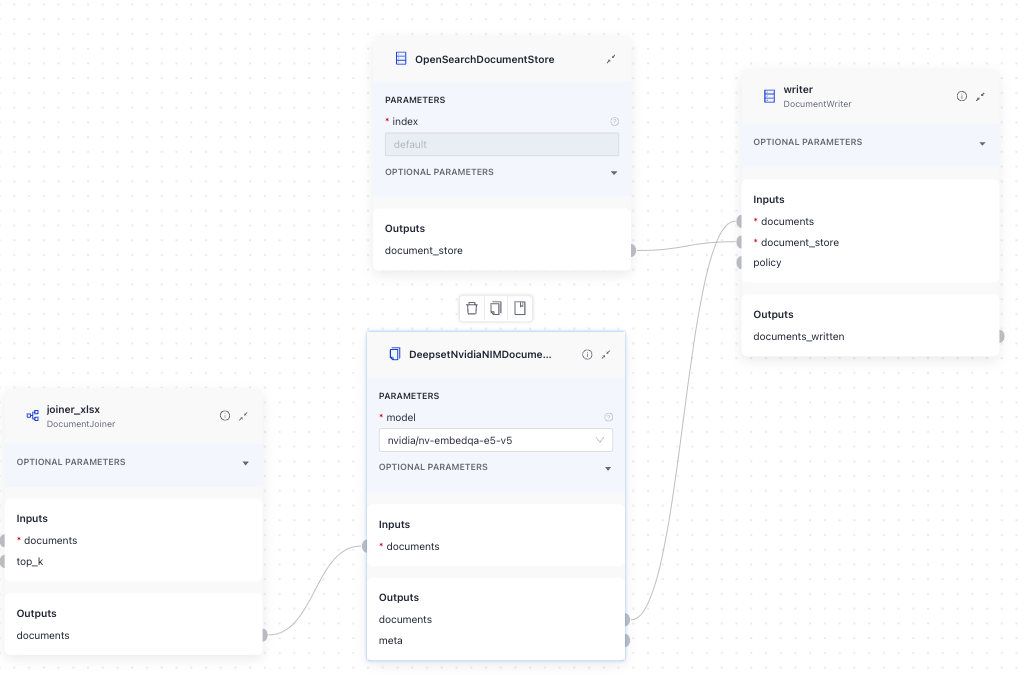
Here's the YAML configuration:
components:
  joiner_xlsx:  # merge split documents with non-split xlsx documents
    type: haystack.components.joiners.document_joiner.DocumentJoiner
    init_parameters:
      join_mode: concatenate
      sort_by_score: false

  DeepsetNvidiaNIMDocumentEmbedder:
    type: deepset_cloud_custom_nodes.embedders.nvidia.nim_document_embedder.DeepsetNvidiaNIMDocumentEmbedder
    init_parameters:
      model: nvidia/nv-embedqa-e5-v5
      prefix: ''
      suffix: ''
      batch_size: 32
      meta_fields_to_embed:
      embedding_separator: \n
      truncate:
      normalize_embeddings: true
      timeout:
      backend_kwargs:

  writer:
    type: haystack.components.writers.document_writer.DocumentWriter
    init_parameters:
      document_store:
        type: haystack_integrations.document_stores.opensearch.document_store.OpenSearchDocumentStore
        init_parameters:
          hosts:
          index: default
          max_chunk_bytes: 104857600
          embedding_dim: 768
          return_embedding: false
          method:
          mappings:
          settings:
          create_index: true
          http_auth:
          use_ssl:
          verify_certs:
          timeout:
      policy: OVERWRITE

connections:
  - sender: joiner_xlsx.documents
    receiver: DeepsetNvidiaNIMDocumentEmbedder.documents
  - sender: DeepsetNvidiaNIMDocumentEmbedder.documents
    receiver: writer.documents
Parameters
Inputs
| Parameter | Type | Description |
|---|---|---|
documents | List[Document] | Documents to embed. |
Outputs
| Parameter | Type | Description |
|---|---|---|
documents | List[Document] | Documents with their embeddings added to the metadata. |
meta | Dict[str, Any] | Metadata regarding the usage statistics. |
Init Parameters
These are the parameters you can configure in Pipeline Builder:
| Parameter | Type | Default | Description |
|---|---|---|---|
| model | DeepsetNvidiaNIMEmbeddingModels | DeepsetNvidiaNIMEmbeddingModels.NVIDIA_NV_EMBEDQA_E5_V5 | The model to use for calculating embeddings. Choose the model from the list. |
| prefix | str | A string to add at the beginning of each document text. Can be used to prepend the text with an instruction, as required by some embedding models, such as E5 and bge. | |
| suffix | str | A string to add at the end of each document text. | |
| batch_size | int | 32 | The number of documents to embed at once. |
| meta_fields_to_embed | List[str] | None | None | List of meta fields that should be embedded along with the document text. |
| embedding_separator | str | \n | Separator used to concatenate the meta fields to the document text. |
| truncate | EmbeddingTruncateMode | None | None | Specifies how to truncate inputs longer than the maximum token length. Possible options are: START, END, NONE. If set to START, the input is truncated from the start. If set to END, the input is truncated from the end. If set to NONE, returns an error if the input is too long. |
| normalize_embeddings | bool | True | Whether to normalize the embeddings. Normalization is done by dividing the embedding by its L2 norm. |
| timeout | float | None | None | Timeout for request calls in seconds. |
| backend_kwargs | Dict[str, Any] | None | None | Keyword arguments to further customize the model behavior. |
Run Method Parameters
These are the parameters you can configure for the component's run() method. This means you can pass these parameters at query time through the API, in Playground, or when running a job. For details, see Modify Pipeline Parameters at Query Time.
| Parameter | Type | Default | Description |
|---|---|---|---|
| documents | List[Document] | Documents to embed. |
Was this page helpful?